ISN or Spectora sync
Sync Manager connects your inspection software, so orders, clients, and agents flow into your CRM on their own.
01 / Services
Every channel. One pack.
Brand, leads, and automation under one roof, tracked to revenue.
Your digital marketing foundation.
Reach people ready to hire you.
Nurture leads. Build lasting relationships.
02 / Who We Help
Built for service businesses.
Home services, construction, and professional practices that live on local leads.
03 / About
Meet the pack.
Former operators. Transparent reporting. Results you own.
04 / Resources
Sharpen your edge.
Guides, a podcast, free tools, and how-to help.
Your inspection software knows every order. Your CRM should know every agent. We set up HubSpot or ActiveCampaign for how an inspection business actually runs: ISN or Spectora synced, buyer's and listing agents tracked, and automations that follow up with agents so the next referral comes to you.





The Inspector's Problem
Most inspections come from a handful of real estate agents, and most agents work with more than one inspector. The agent who sent you three inspections last spring is one slow follow-up away from trying someone else. Your inspection software records the order, but it does not tell you which agents are cooling off, which ones just sent their first referral, or who deserves a thank-you this week.
A generic CRM does not fix that. It was built for sales teams chasing leads, not for a business where the customer changes every transaction and the referral partner is the real relationship. So inspectors end up with a contact list in one place, orders in another, and follow-up that depends on someone remembering.
We built our inspector CRM setup around the agent, not the lead. Every inspection updates the agent’s record. Every agent gets the right follow-up at the right moment, automatically.
How We Set It Up
We start with the data model, because the automations only work if the data is right. Agents are contacts, linked to their agency as a company, with inspection counts for lifetime, the last 12 months, and year to date on each record. Every inspection order is a deal in its own pipeline, moving from unscheduled to scheduled to completed, or lost. Homebuyers and sellers are contacts too, tied to the inspection they booked.
Sync Manager, WolfPack’s own integration layer, keeps it all current from ISN or Spectora: new order in, deal created, agents linked, counts updated. Nothing for your office to type.
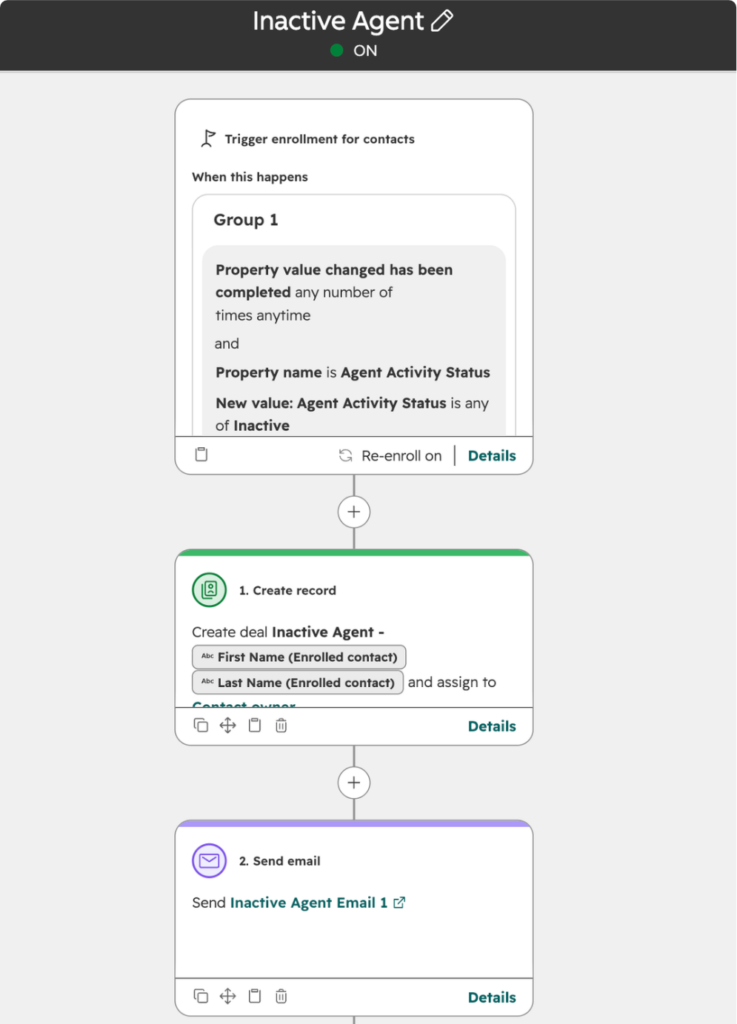
On top of that model we launch the automations that earn referrals: a welcome track for first-time buyer’s and listing agents, re-engagement when an agent goes quiet, and milestone thank-yous as agents hit their 2nd, 5th, and 10th inspection with you. Each automation runs as its own campaign, so you can see the inspections it influenced.
Our Approach
An inspector CRM that sticks follows a clear order: learn how you run, build the data model, connect your software, then train your team. Here is how every WolfPack inspector onboarding works.
We learn how your business runs: how many inspectors, which software you book in, where referrals come from, and what your office needs to see. If you already have HubSpot or ActiveCampaign, we audit what is there and find what is missing. We also recommend the platform that fits your team and budget, and you get a custom quote from discovery: onboarding is scoped per project, not sold in tiers.
We set up your pipeline, agent and agency records, inspection properties, and automations from our home inspector template, adjusted to how you work, and move your contacts in clean.
We link ISN or Spectora through Sync Manager, plus your website forms and other lead sources, so the CRM fills itself with real inspection data.
We train your team, test every automation against real orders, and turn them on. From there you can run it yourself or hand it to our CRM Management team.
What's Included
Sync Manager connects your inspection software, so orders, clients, and agents flow into your CRM on their own.
Every order lands as a deal and moves from unscheduled to scheduled to completed, or lost, as your software updates.
Buyer's and listing agents linked to each inspection and to their agency, with lifetime, 12-month, and year-to-date inspection counts.
First-time referring agents get a welcome track that works to earn the next inspection, on the buy side and the sell side.
When an agent's rolling 12-month count drops, they get a re-engagement sequence and your team gets a call or text task.
Thank-you emails at an agent's 2nd, 5th, and 10th inspection with you, and a personal note on their birthday.
Warranty inspection reminders on new construction and annual maintenance touches that bring past clients back.
Each automation reports the inspections and revenue it influenced, so you know what is working.
Platform Expertise
A home inspection usually has a buyer's agent and a listing agent, and both matter. Our setup records each one on the inspection, links them to their agency, and counts the inspection toward their totals. Listing agents get their own nurture, because an agent who saw your report on the sell side is a future referral on the buy side.
A lifetime count hides the agent who sent you twelve inspections two years ago and none since. We track lifetime, the last 12 months, and year to date on every agent record, and the Inactive Agent automation watches the rolling number. When it drops, the agent gets a re-engagement sequence and your team gets a call or text task.
WolfPack was founded by former home inspectors. We are ISN's official digital marketing partner and an InterNACHI Superior Service Vendor, and inspection companies make up most of the CRM builds we run. Your CRM specialist already knows what an inspection agreement is, why the report publish date matters, and which agents are worth a phone call.
Integrations
Sync Manager is included with every onboarding and every CRM Management plan. Here is what each connection syncs and what it triggers.

WolfPack is ISN's official digital marketing partner.
What syncs: each order's client, buyer's agent, and listing agent as contacts, with agents linked to their agency. Each order becomes a deal with inspection type, date and time, fee, address, inspector, add-on services, paid, agreement signed, and report completed.
What it triggers: an inspection booked creates the contact and the deal. Confirmed, completed, or canceled updates the deal stage. Paid and completed marks the deal won. Each completed inspection updates the agent's totals for lifetime, the last 12 months, and year to date.
How it connects: ISN API connection through Sync Manager, with a nightly catch-up sync. Works with HubSpot and ActiveCampaign.

What syncs: the client, buyer's agent, and listing agent as contacts, with agents linked to their agency. Each inspection becomes a deal with inspection type, services and add-ons, date and time, fee, address, inspector, paid, agreement required and signed, and report published, plus any Spectora custom fields you choose to map.
What it triggers: an inspection booked creates the contact and the deal. Confirmed, published, or canceled moves the deal to the stage you map. Paid, published, and agreement signed marks the deal won. Each completed inspection updates the agent's totals for lifetime, the last 12 months, and year to date.
How it connects: Spectora API with real-time webhooks through Sync Manager. Works with HubSpot and ActiveCampaign.

Connects HubSpot or ActiveCampaign to thousands of other apps when there is no direct integration, like website forms, scheduling tools, and more.
What it triggers: new record in a connected app creates a contact in your CRM. A completed job in a connected app updates it.
How it connects: Zapier connection through Sync Manager, set up by WolfPack. Works with HubSpot and ActiveCampaign.
Why WolfPack
Inspector Roots
WolfPack was founded by former home inspectors. We are ISN’s official digital marketing partner and an InterNACHI Superior Service Vendor, and inspection companies make up most of the CRM builds we run. You are not explaining your business to us.
Both Platforms
We build on both and we will tell you which one fits. HubSpot for inspectors who want marketing, pipeline, and reporting in one system that scales. ActiveCampaign for inspectors who mainly want email and SMS automation on a leaner budget.
Sync Manager
Sync Manager, WolfPack’s own integration layer, connects ISN and Spectora to either platform and is included with every onboarding and every CRM Management plan. It runs behind the scenes, with nothing for your office to manage.
Ownership
Everything we build lives in your own HubSpot or ActiveCampaign account. Your agents, orders, automations, and history stay yours if you ever change platforms or bring management in-house.
Pricing
Three ways to get a home inspector CRM built and kept running. Every option includes Sync Manager.
From $750 one-time
Your CRM built from our home inspector template, connected to ISN or Spectora, and launched with your team trained.
Build
Connect
Launch
Keeps your Sync Manager connection and your automations running after launch, without a full management plan.
Basic, Advanced, or Pro per month
Your CRM managed and improved every month, with Sync Manager included.
Basic
Advanced
Pro
Platform licensing is separate: HubSpot is paid directly to HubSpot, and ActiveCampaign is billed through WolfPack. Sync Manager is included with onboarding and with every CRM Management plan.
Meet the Pack

CEO & Founder

CRM Specialist

Operations & Client Success Coordinator
Case Studies
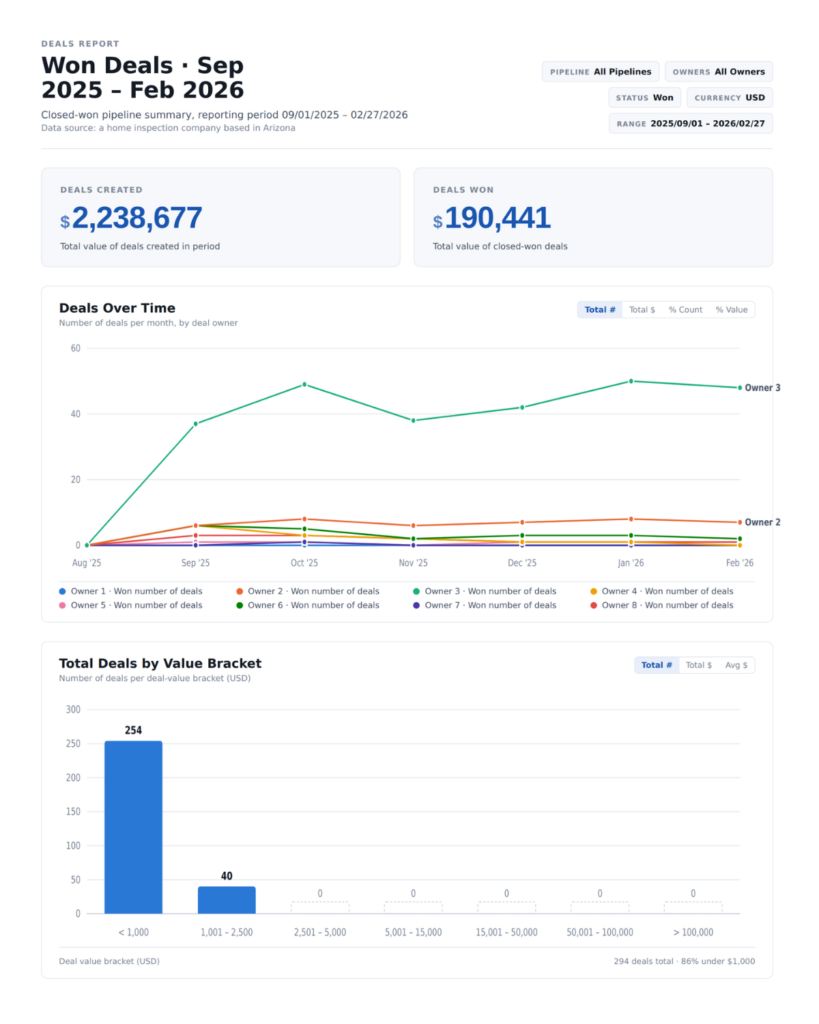
$166,021 Inactive Agent Reactivation Revenue
56.59% Email Open Rate (Apr-Jun 2026, 22 campaigns)
$646,764 Pipeline Created (May–Aug 2026)
Related Reading
Quick Questions
The best CRM for a home inspector is one that is modeled on agents and inspections, not on generic sales leads. That means agents as contacts linked to their agency, inspection counts for lifetime, the last 12 months, and year to date, and every order as a deal in an inspection pipeline. Both HubSpot and ActiveCampaign can be set up that way, and both connect to ISN and Spectora through WolfPack’s Sync Manager. The platform matters less than the setup. An inspector CRM with the right data model and the New Buyer’s Agent, New Listing Agent, and Inactive Agent automations running will outperform a more expensive tool with a blank contact list.
For most home inspectors who want to grow, HubSpot is the better fit. It keeps your marketing, inspection pipeline, and reporting in one place, links each referring agent to their agency, and scales as you add inspectors and offices. ActiveCampaign is a strong, budget-friendly choice for inspectors who mainly want email and SMS automation, agent nurture, and a simple pipeline, or who already use it. Billing differs too: HubSpot licensing is paid directly to HubSpot, while ActiveCampaign licensing is billed through WolfPack. Sync Manager, our inspector template, and the agent automations work on both. On your strategy call we recommend the one that fits your team and budget, and we build on either.
Yes. WolfPack’s Sync Manager connects ISN to either HubSpot or ActiveCampaign through the ISN API, with a nightly catch-up sync. When an order is booked, the client, buyer’s agent, and listing agent are created or updated as contacts, and agents are linked to their agency. The order becomes a deal with inspection type, date and time, fee, address, inspector, add-on services, paid, agreement signed, and report completed, and it moves through your pipeline as the order is confirmed, completed, or canceled. Each completed inspection updates the agent’s referral totals. WolfPack is ISN’s official digital marketing partner, and Sync Manager is included with every onboarding. See the ISN integration.
Yes. Sync Manager connects Spectora to either platform through Spectora’s API and real-time webhooks. When an inspection is booked, the client, buyer’s agent, and listing agent are created or updated as contacts and linked to their agency. The inspection becomes a deal with inspection type, services and add-ons, date and time, fee, address, inspector, paid, agreement signed, and report published, plus any Spectora custom fields you want mapped. The deal moves to the stage you choose as the inspection is confirmed, published, or canceled, and each completed inspection counts toward the agent’s totals. See the Spectora integration.
Start with the three that touch agents. Inactive Agent re-engagement watches each agent’s rolling 12-month inspection count and reaches out, with a call or text task for your team, when it drops. New Buyer’s Agent welcomes a first-time referring agent and works to earn the second inspection. New Listing Agent follows up with agents who met you on the sell side. From there, add agent milestones and birthdays, and homeowner follow-ups like the 11-month warranty reminder on new construction. Each automation runs as its own campaign, so within a few months you can see which ones produce inspections and put more behind those.
Most inspector CRM setups with WolfPack take about 1 to 4 weeks. A single-inspector company moving from spreadsheets and connecting one piece of software is on the short end. A multi-inspector company with several offices, a large contact import, and custom automations takes longer. The order is always the same: discovery, build, connect ISN or Spectora through Sync Manager, then train your team and launch. Results start as soon as the agent automations go live, because they begin working the agents already in your software on day one.
There are three parts. First, your platform license: HubSpot pricing is paid directly to HubSpot, and ActiveCampaign pricing is billed through WolfPack. Second, a one-time onboarding fee that starts at $750 and scales with complexity, like the number of inspectors, integrations, automations, and contacts to import. Third, an optional monthly plan: a maintenance plan that keeps your integrations running, or CRM Management with dedicated specialist hours each month on Basic, Advanced, or Pro. Sync Manager is included with onboarding and with every CRM Management plan. You get a custom quote on your strategy call.
Yes. If you already use HubSpot or ActiveCampaign, we start with an audit. We review your pipelines, properties, automations, and data, find what is missing or broken, and fix what matters most first. Then we connect ISN or Spectora through Sync Manager, add agent and agency records and inspection counts if you do not have them, and fill the gaps in your agent follow-up. You keep everything you have built, and it all stays in your own account. If you want us to keep it running afterward, our CRM Management service manages and improves it every month.
Yes. The inspector data model scales from a single inspector to a multi-office company. Every inspection records the inspector who performed it, so you can report referrals and revenue by inspector and by office. For franchise and multi-location groups, we build each location on the same template, so automations and reporting match across markets while each office sees its own agents and pipeline. HubSpot is usually the better fit at that size because of its reporting and user management, and we will walk through that with you on your strategy call.
Reviews
Tell us what you run today. We will map the inspector CRM build, the ISN or Spectora sync, and the automations to launch first, and walk you through it on a short call.