
Last updated on June 23rd, 2026 at 01:40 pm
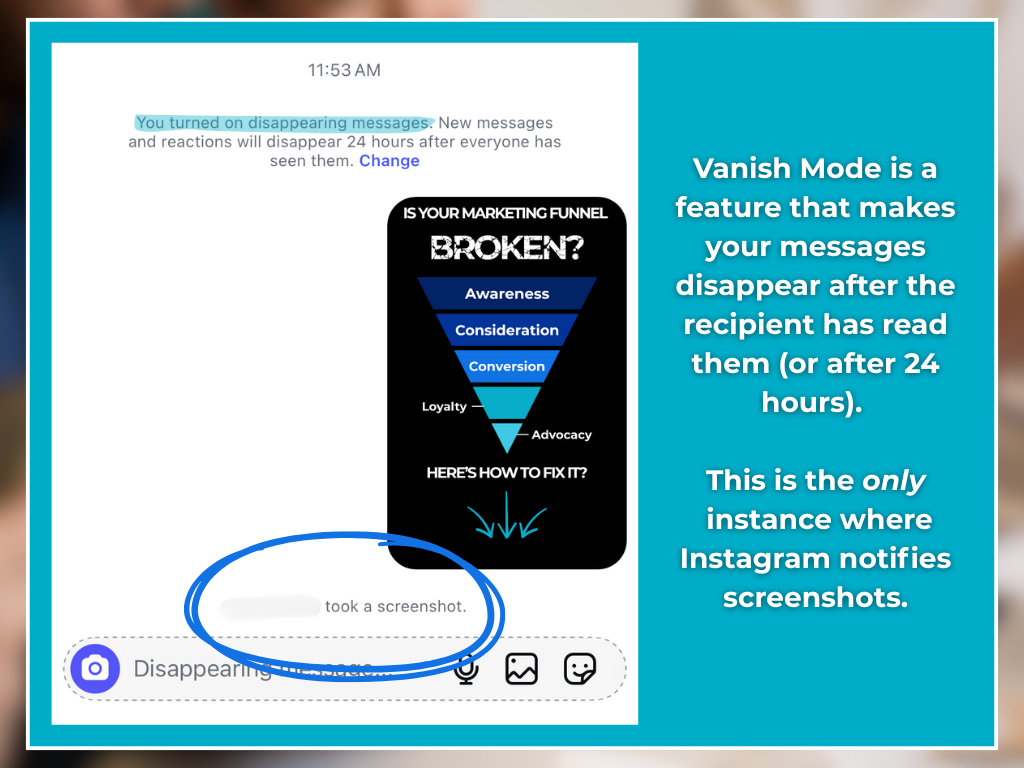
If you screenshot an Instagram post, the other person will not get a notification. Instagram does not alert users when someone screenshots posts, reels, or profiles. The only time Instagram sends a screenshot notification is for disappearing photos or videos in direct messages.
This means you can save content for later reference without the other person knowing. For everyday users, it’s a relief that screenshots of posts are private. For businesses, it’s a reminder to focus on measurable engagement tools like likes, shares, saves, and comments rather than hidden actions like screenshots.
What Happens When You Screenshot a Post on Instagram
Here’s the simple breakdown:
- Posts, reels, and profiles → No notification sent.
- Stories → No notification sent.
- Disappearing photos/videos in DMs → Notification sent.
For most of Instagram, screenshots are silent and invisible to the other person.
The one exception is when you take a screenshot of a disappearing photo or video in a direct message using Vanish Mode. In that case, Instagram will alert the sender.
This approach helps balance privacy and sharing. Public content like posts and reels are designed to spread widely, so there’s no reason to restrict how people save or use them.
But disappearing content is meant to be temporary and private, which is why Instagram protects that with alerts.
Why Instagram Doesn’t Notify Screenshots of Posts
Instagram is built around sharing, discovery, and creativity.
Notifying every screenshot would discourage users from engaging with content in the way they naturally want to. For example, people often screenshot recipes, quotes, or tips to use later.
By keeping screenshots of public posts private, Instagram makes the platform easier to use. It also reinforces the idea that posts are meant to be seen, shared, and even saved for reference.
At the same time, the platform draws a clear line around private conversations. Disappearing photos and videos in DMs are treated differently because they’re not meant to last, so notifications are a way to respect privacy in those settings.
Instagram has tested different approaches in the past, but the current system is simple and predictable: public posts are safe, private temporary content is protected.
Can Instagram Change Its Screenshot Policy in the Future?
Instagram has tested screenshot notifications in the past, especially for Stories.
While these features were later removed, it shows that Instagram occasionally experiments with privacy settings. Policies can change as user expectations evolve, so it’s always worth keeping an eye on official updates.
For businesses, this means being adaptable and ready to adjust engagement strategies if new features roll out. But for now, it’s important to focus on Instagram’s Save and Collections features.
How Businesses Can Use This Information for Sales
Screenshots may not trigger alerts, but they signal that someone found your content valuable enough to keep.
While you can’t measure screenshots directly, you can measure the behaviors that often happen alongside them like saves, shares, and comments. These engagement signals are powerful because they point to higher-quality prospects.
- Saves = intent: A saved post shows someone wants to revisit it later. This is an active buying signal that the prospect is not passively scrolling.
- Shares = advocacy: Shared posts extend your reach and show trust in your content.
- Comments = connection: Conversations build familiarity and credibility which shortens the sales cycle.
Data proves the value of screenshots:
- HubSpot found prospects who interact on social are more likely to move further down the sales funnel compared to those who don’t engage.
- The 2024, Sprout Social Index reports 90% of consumers buy from brands they follow, and 75% spend more after following for a year or longer.
- Salesforce shows companies using social engagement in lead scoring see 20–40% higher close rates.
These stats show engagement isn’t about vanity, it’s about intent. Engaged prospects already trust your brand, which reduces friction and increases conversions.
There’s also a reverse action: instead of only waiting for prospects to engage with you, engage with them.
At WolfPack Advising, automations in our CRM create tasks whenever a new deal opens, prompting our team to like, comment, or follow that prospect’s social profiles.
Engaging with prospects that save your content, makes them feel seen, valued, and connected in a personal way.
By engaging directly with prospects who already came in through another channel (like a referral or website form), you reinforce that relationship and increase the chance of closing.
The takeaway: even though Instagram doesn’t notify about screenshots, businesses can use inbound signals (saves, shares, comments) and outbound actions (engaging with prospects) to strengthen trust and accelerate sales.
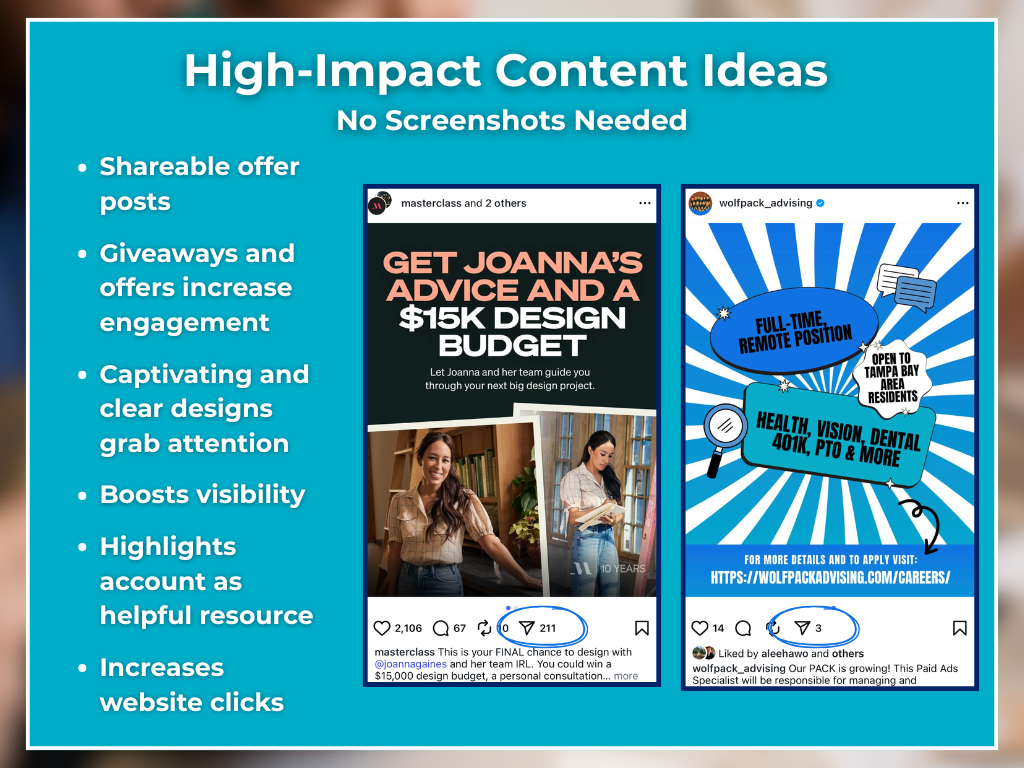
Alternatives to Screenshots for Businesses
Since screenshots don’t provide any direct data, businesses should lean into the tools Instagram makes available.
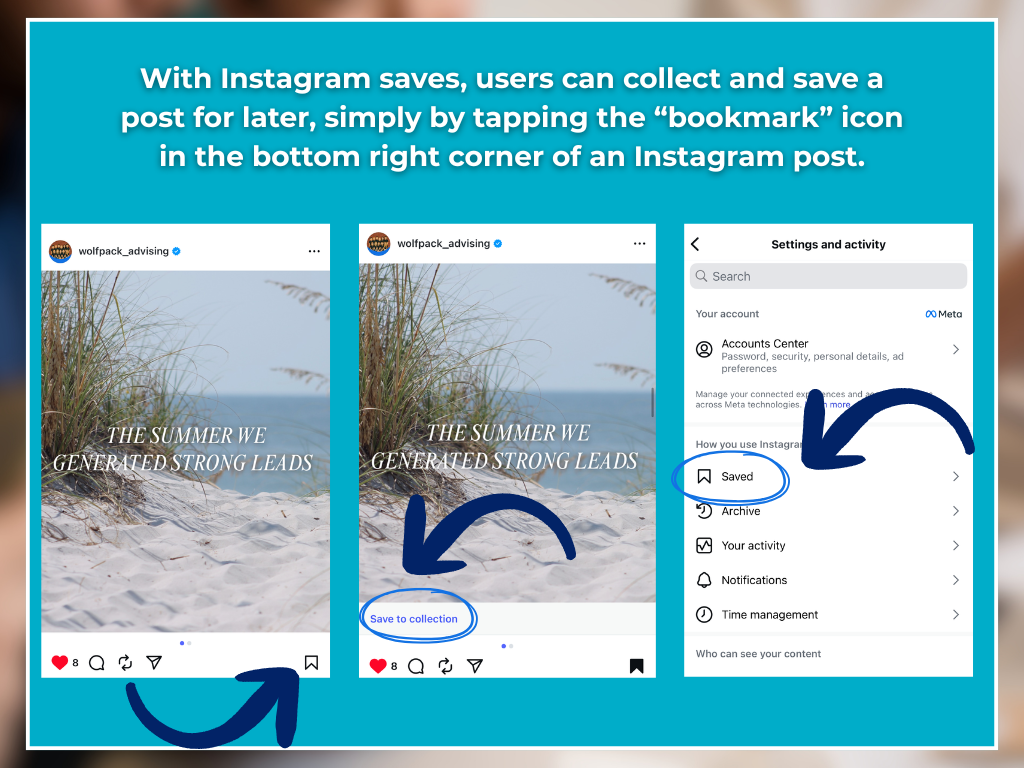
- Promote “Save Post”: This is a built-in feature that acts like a personal bookmark for users. Encourage followers to save your tips or reminders by adding a friendly note in your captions.
- Use engaging content formats: Stories, Reels, and Carousels tend to get more interaction because they’re quick and easy to share. They’re also more likely to reach a wider audience.
- Encourage tagging: Asking followers to tag your business when they use your tips or try your services builds social proof and spreads awareness organically.
By guiding users toward actions that leave visible footprints, like saving, sharing, and tagging, you gain insights into what works while still respecting how people choose to interact with your content.
Privacy Tips for Instagram Users
If you’re concerned about privacy when it comes to screenshots and sharing:
- Remember that posts are public by default, so anyone can save or reshare them.
- Use private accounts to control who sees your content.
- For personal conversations, rely on DMs and be aware of the disappearing media alerts.
These reminders help both everyday users and businesses create content that respects boundaries while still promoting engagement.
Related Questions
Does Instagram notify when you screenshot a story?
No, Instagram does not notify users when someone screenshots a story. Stories are considered public content, similar to posts.
Does Instagram notify when you screenshot DMs?
Yes, but only for disappearing photos or videos in direct messages. Standard text messages or shared posts are not included.
How can businesses track Instagram engagement without screenshot data?
By using Instagram Insights. Metrics like saves, shares, reach, and link clicks are visible and provide reliable data to shape content strategies.
What’s the best way to encourage followers to save posts?
Create helpful content that your audience will want to return to later, such as seasonal checklists, quick maintenance guides, or step-by-step how-tos.
Does Instagram notify when you screenshot a reel?
No, Instagram does not send notifications when users screenshot reels.
Conclusion
So, does Instagram notify when you screenshot a post? The answer is no. Instagram only sends screenshot alerts for disappearing media in direct messages, not for posts, reels, or stories.
For businesses, this highlights the importance of focusing on measurable engagement tools like saves, shares, and comments. Screenshots may happen, but it’s the visible actions that drive real results.
If you want to grow your reach and turn Instagram engagement into real sales, WolfPack Advising’s Social Media Management Services can help you design a strategy that works.