
Learning how to create a Facebook business page is one of the first steps to getting your business found online. The process is free and takes less than 20 minutes. But the choices you make during setup will decide whether your page actually brings in leads or just sits there collecting dust.
Most home service business owners (inspectors, pest control techs, roofers, plumbers, HVAC pros) create a page, post once or twice, and wonder why the phone never rings. The problem usually is not Facebook. It is how the page was built and what happened after it went live.
This guide will walk through the full process: creating your page, optimizing it for leads, managing it over time, and tracking whether it is actually working.
How Is a Facebook Business Page Different From a Personal One?
A Facebook business page is a free, public profile built for businesses and organizations. It is separate from your personal account. Visitors only see your business name, photos, posts, reviews, and contact details.
For local service businesses, your Facebook page is often the first place a potential customer checks before picking up the phone. They want to see what your business looks like, read reviews, and confirm basic details like your phone number and service area.
Facebook has over 3 billion monthly active users worldwide, including roughly 280 million in the United States. More than two out of three users visit a local business page at least once a week. If your page is missing or incomplete, you are handing those leads to a competitor who showed up.
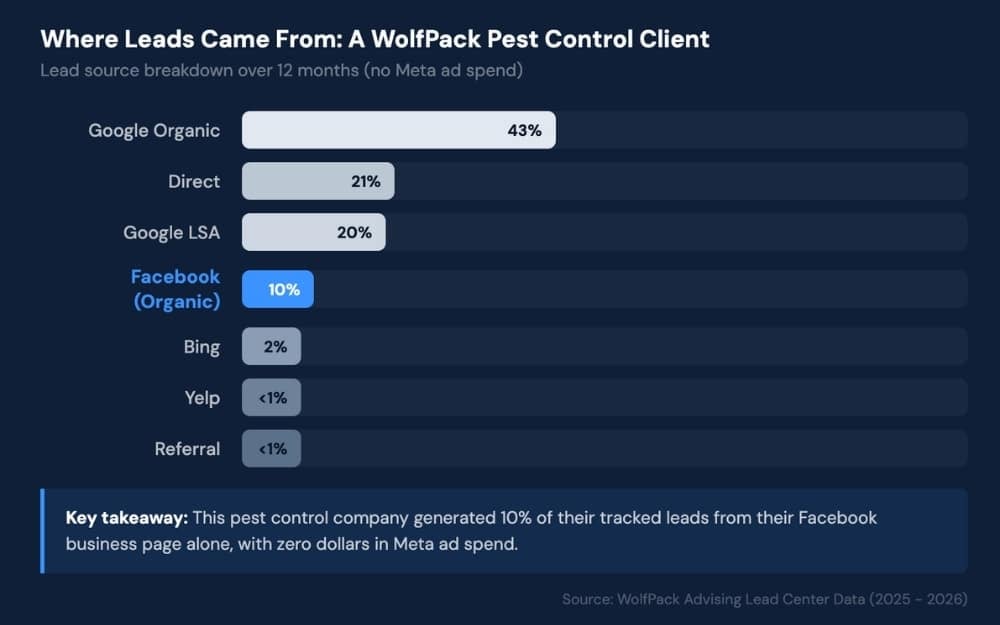
One WolfPack client, a pest control company in Georgia, generated nearly 10% of their total tracked leads directly from their Facebook page with zero ad spend behind it. The page itself did the work.
Beyond that, a business page also gives you tools a personal profile does not have, like analytics, CTA buttons, Meta ads, and Instagram integration.
How to Create a Facebook Business Page: Step-by-Step
Setting up your page is the easiest part. Here is exactly how to do it.
Log In and Find the “Create a Page” Option
You need a personal Facebook account to create a business page. Your personal information will not be visible on the business page. It just serves as the admin account behind the scenes.
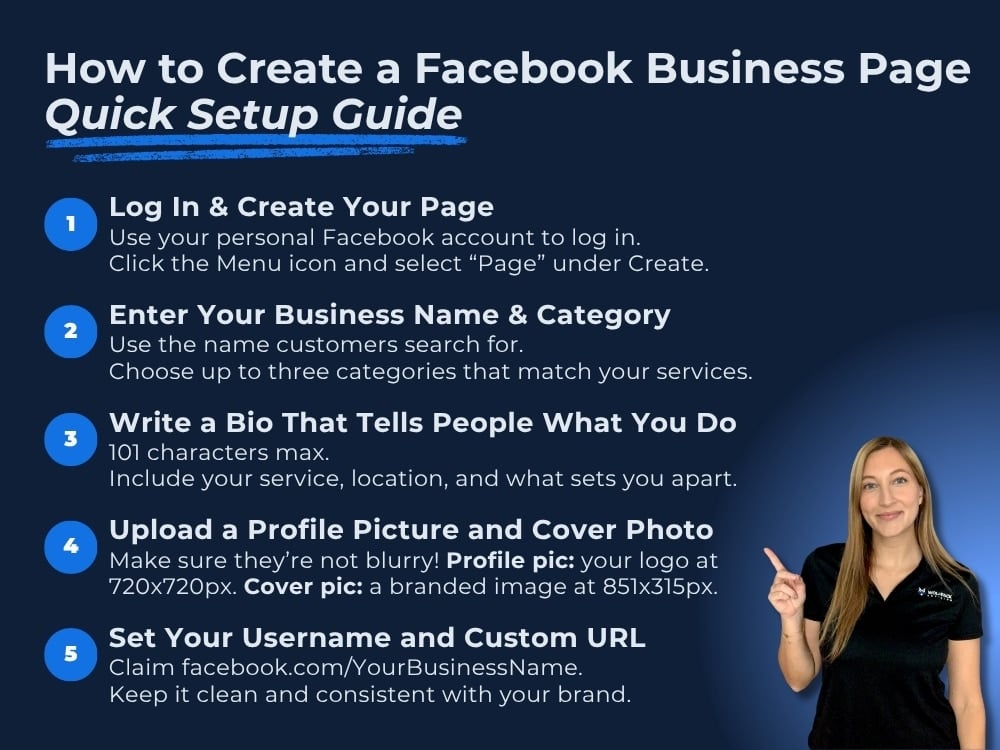
Log in, click the menu icon (the grid of nine dots in the top right on desktop), and select “Page” under the “Create” section. On mobile, tap the menu button, then “Pages,” then “Create.”
Enter Your Business Name and Category
Use your actual business name, the one customers would search for on Google. If you are a local company, you can include your city (for example, “Evergreen Pest Control Tampa”).
Facebook lets you choose up to three categories. Pick the ones that describe what you actually do. Common industry options for home service businesses include:
- Home Inspector
- Pest Control Service
- Plumbing Service
- Roofing Service
- HVAC Service
- Junk Removal Service
- Lawn Care Service
Choose categories that match your actual services. Accurate categories help Facebook show your page to the right people in search results.
Write a Bio That Tells People What You Do
Your bio is limited to 101 characters, so every word needs to count. Include what you do, where you do it, and what makes you different. Skip vague language like “quality service you can trust” and be specific instead.
Here are a few examples for home service businesses:
- “Licensed home inspections in Orlando. Same-week scheduling available.”
- “Family-owned pest control serving Tampa Bay since 2010.”
- “24/7 emergency plumbing repairs in Denver and surrounding areas.”
Want more help with this part? This guide on how to write a Facebook bio for your business is a great place to start.
Upload a Profile Picture and Cover Photo
Your profile picture shows up next to your business name everywhere on Facebook. Use your logo. The recommended size is 170 by 170 pixels, but upload at 720 by 720 for the best quality since Facebook crops it into a circle.
Your cover photo is the large banner across the top of your page. Use a clean, branded image: a photo of your team, your truck with your logo, or a simple branded graphic. The recommended size is 851 by 315 pixels on desktop.
Keep in mind that 98.5% of Facebook users access the platform on mobile. If your logo is blurry or your cover photo gets cropped awkwardly on a phone, that is the first impression most people will see.
Avoid blurry, pixelated, or missing images. A page without photos looks unfinished and untrustworthy, and that alone can cost you leads.
Set Your Username and Custom URL
Once your page is created, set a username. This gives you a clean, personalized URL like facebook.com/YourBusinessName instead of a long string of random numbers.
Keep your username simple and consistent with your business name. Avoid extra numbers, underscores, or abbreviations that make it harder to find you.
What to Do Before You Make Your Page Public
Creating the page is just the skeleton. Before you invite anyone to follow it, take time to fill in the details that turn a blank page into a real lead-generating tool.
Fill Out Every Field in Your About Section
Go to your page settings and complete every available field: phone number, email, website URL, physical address (if applicable), service area, and business hours.
Customers who land on your page need a fast way to contact you. Facebook also uses this information in search results. An incomplete page is less likely to show up when someone searches for a service you offer in your area.
Add a Call to Action Button
Facebook lets you place a CTA button right below your cover photo. For home service businesses, the most useful options are:
- Call Now: if you want phone calls (best for businesses that book over the phone)
- Book Now: if you use an online scheduling tool
- Get Quote: if you want to send people to a contact form or estimate request page
- Send Message: if you prefer to start conversations through Facebook Messenger
Pick the one that matches how you actually get customers. Across WolfPack’s home service clients, phone calls make up the vast majority of all tracked leads, often over 80%. For most companies in this space, ‘Call Now’ is the right default.
Turn On Messaging and Set Up an Instant Reply
Many home service businesses miss leads because Messenger is not turned on, or messages go unseen for days.
Enable messaging in your page settings, then set up an instant reply so people get an immediate automatic response when they reach out:
“Thanks for reaching out! We typically respond within a couple of hours during business hours. Feel free to call us at [phone number] for faster service.”
Post 3 to 5 Times Before Going Live
Nobody is going to follow a blank page. Before you share your page publicly, put up a few posts so there is something to see:
- An introduction post explaining who you are and what you do
- A before-and-after photo from a recent job
- A screenshot of a positive customer review
- A quick seasonal tip related to your service
- A “now booking” post with your phone number or scheduling link
Mix up the format between photos, text posts, and short videos. Pages that launch with a variety of content look more established and give visitors a reason to scroll.
Once your page is live, these first few posts also set the tone for the kind of content your audience can expect going forward. Make sure to pay attention to which kinds of content get the most engagement!
How to Optimize Your Facebook Business Page for More Leads
A completed page is good. An optimized page is better.
These steps help your page show up in more searches and convert more visitors into actual leads.
Use Keywords in Your Page Description
Facebook has its own internal search engine.
When someone searches “pest control near me” or “home inspector in Tampa” on Facebook, the platform pulls results based on page names, categories, and descriptions.
Include your city, service type, and service area naturally in your page description (found under the About section). Just write a clear, concise description of what you do and where you do it, and the right keywords will be there.
Enable and Manage Reviews
Facebook reviews (called Recommendations) are visible, trusted, and often the deciding factor for someone choosing between you and a competitor. Make sure the Recommendations feature is turned on in your page settings.
When you get a review, respond to it. Thank happy customers. Address concerns from unhappy ones calmly and professionally. This shows future visitors that you are active and trustworthy.
Build reviews into your process. After completing a job, ask your customer to leave a recommendation on your Facebook page. The businesses that ask consistently are the ones with the strongest review profiles.
Connect Your Page to Instagram and Meta Business Suite
If you have an Instagram business account (or plan to create one), link it to your Facebook page through Meta Business Suite. This lets you cross-post content, view combined analytics, and manage messages from both platforms in one place.
It also sets you up for running Meta ads down the road, which require a connected Facebook business page to get started.
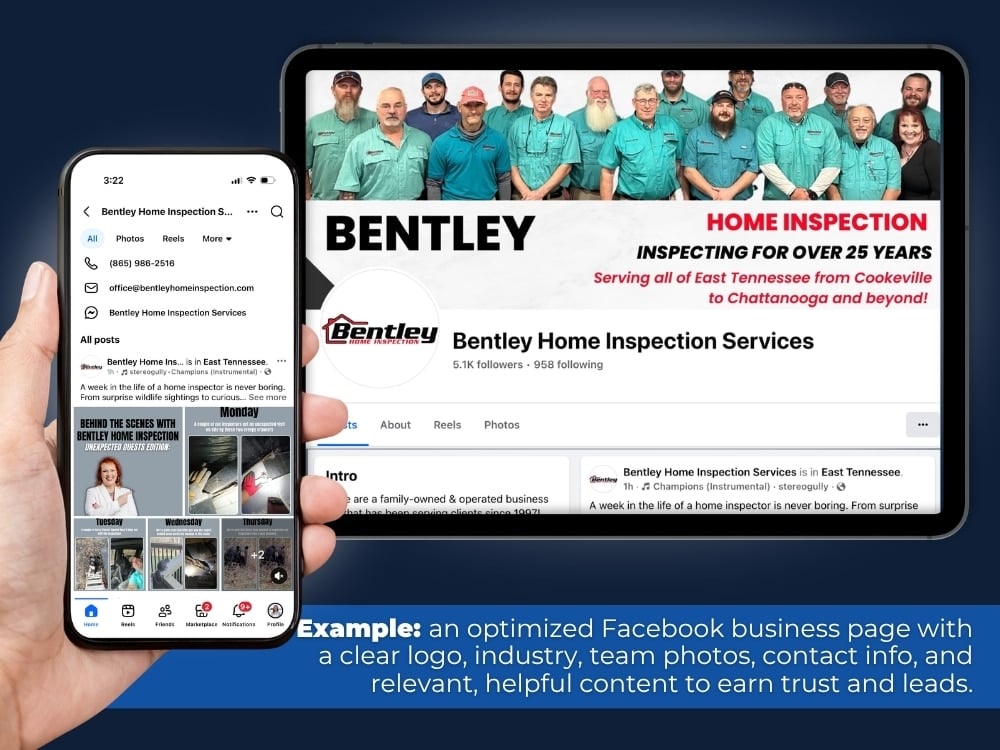
Managing Your Facebook Business Page After Launch
Creating and optimizing your page is not the finish line.
The businesses that get consistent leads from Facebook are the ones that stay active, pay attention to their numbers, and know where their leads are coming from.
What to Post and How Often
Aim for two to four posts per week. Consistency matters more than perfection. You do not need a design team or a content calendar. You just need to show up regularly.
Content types that work well for home service businesses:
- Before-and-after photos from completed jobs
- Quick tips your customers would find helpful (for example, “How to check for termite damage around your foundation”)
- Seasonal reminders tied to your services (for example, “Spring is the busiest season for roof inspections. Book yours now.”)
- Team spotlights that show the people behind the business
- Review highlights where you screenshot or share a great customer review
- Short videos showing your team in action, a completed project, or a quick walkthrough of a common issue
Every post is another chance for someone to see your name, remember your business, and reach out when they need your service.
In case you’re unsure, here’s a guide on how to make a post shareable on Facebook.
How to Track Performance With Facebook Insights
Facebook gives you free analytics through Meta Business Suite. Access it by clicking “Insights” from your page or logging into business.facebook.com.
The metrics that matter most for lead generation:
- Page views tell you how many people are visiting your page
- Post reach shows how many people saw each post
- Actions on the page will track how many people clicked your phone number, website link, CTA button, or sent you a message
- Follower growth shows whether your audience is growing over time
Check these numbers at least once a month. If post reach is dropping, try different content types. If actions on the page are low, revisit your CTA button and contact information.
The data tells you what is working and what needs to change.
How to Tell Which Leads Come From Your Facebook Page
One of the most common questions business owners ask is, “How do I know if Facebook is actually bringing me leads?” Here are a few simple ways to find out.
- Check “Actions on Page” in Insights. This shows how many people clicked to call you, visit your website, get directions, or message you directly from your Facebook page.
- Use UTM parameters on your website link. Add a UTM tag to your website URL on your Facebook page so Google Analytics can track how much traffic comes from Facebook:
- yourwebsite.com?utm_source=facebook&utm_medium=social&utm_campaign=business_page
- Ask new customers how they found you. Whether over the phone, in a form, or at the first appointment, this simple question gives you real attribution data.
If you use a CRM, you can take this further by tagging leads by source and tracking them to closed deals. But even without one, these methods give you a clear picture of whether your page is pulling its weight.
Common Mistakes That Stop Your Page From Generating Leads
If your page is not bringing in leads, chances are one (or more) of these issues is the reason.
- Using a personal profile instead of a business page. A personal profile does not give you access to analytics, ads, reviews, or CTA buttons. If you are running your business from a personal account, you are leaving leads on the table.
- Leaving the About section blank or vague. If a potential customer cannot find your phone number or service area within seconds, they will move on.
- Never responding to messages or reviews. Unanswered messages signal that you are too busy to care or no longer in business.
- Posting once and then going silent for months. An inactive page looks like a closed business. Even one or two posts a week keeps things looking alive.
- Not adding a CTA button. Without a clear next step, visitors have to figure out how to contact you on their own. Most will not bother.
- Ignoring Insights. If you are not checking your numbers, you have no way of knowing what is working or what needs to change.
Check Out This Client Case Study for WolfPack’s Social Media Management Services:
Related Questions
Can I create a Facebook business page without a personal account?
No. Facebook requires a personal account to create and manage a business page. Your personal profile information is never visible to people who visit your business page. It simply acts as the admin login.
Does a Facebook business page help your business show up in AI search results?
It can. AI tools like ChatGPT, Google AI Overviews, and Perplexity pull from across the web when answering questions about local businesses.
A complete, active Facebook page with accurate details and reviews gives these tools more to reference when someone asks for recommendations in your area. It is not a guaranteed ranking factor, but it strengthens the overall online presence that AI engines rely on.
How do I get more followers on my Facebook business page?
Start by inviting current customers, friends, and family. Post consistently with content your audience finds useful. Ask satisfied customers to follow your page after a completed job. Over time, strong content and positive reviews attract organic followers.
Can I run ads from my Facebook business page?
Yes. A Facebook business page is required to run Meta ads on both Facebook and Instagram. You can boost posts directly from your page or build advanced campaigns through Meta Ads Manager, targeting audiences by location, interests, and demographics.
Conclusion
Creating a Facebook business page takes less than 20 minutes. Building one that actually earns leads takes a bit more thought. Every choice matters: your business name, categories, bio, photos, CTA button, and contact details all add up to either a page that builds trust or one that gets scrolled past.
The work does not stop after launch either. Posting regularly, responding to messages and reviews, checking your Insights, and knowing where your leads come from are what keep your page working for you over time.
If you would rather focus on running your business while someone else handles how to create your Facebook business page, WolfPack manages profiles and full social media strategies for home service businesses across the country.