
Last updated on June 23rd, 2026 at 01:40 pm
If your Google Business Profile got suspended recently, you are not alone. If you didn’t, great! Learn from what’s happening to other businesses right now. Thousands of businesses across the country got listings suspended in the last couple of weeks.
Many had done nothing obviously wrong. No warning or explanation. Just gone from Google Maps overnight. For home service businesses, this hits differently. Your Google Business Profile is the first thing a potential customer sees when they search for someone in your area. A suspended Google Business Profile means no map pack placement, no calls, and no leads from Google.
This post breaks down what happened, why Google is doing this, who got hit the hardest, and exactly what to do right now if your business profile is suspended.
Google Business Profile Suspended? What’s Actually Happening
Google has been building a much more aggressive enforcement system over the past year. Before getting into the 2026 waves, here is the scale of what Google was already doing.
According to Google’s own updated spam-fighting report:
| What Google Targeted | Volume |
| Reviews removed or blocked | 292 million |
| Fake Business Profiles removed | 13 million |
| Suspicious edits blocked | 79 million |
| Accounts restricted | 783,000+ |
That enforcement did not slow down heading into 2026. Google rolled out AI-powered detection tools through Gemini that flag suspicious activity in real time, without waiting for a complaint or a manual review. The system sweeps automatically based on patterns across industries, regions, and profile behavior.
Here is where it gets frustrating. The system does not always separate a fake profile from a real one that just happens to look suspicious based on certain signals. That is how verified, long-standing businesses with zero policy violations got swept up alongside the actual bad apples.
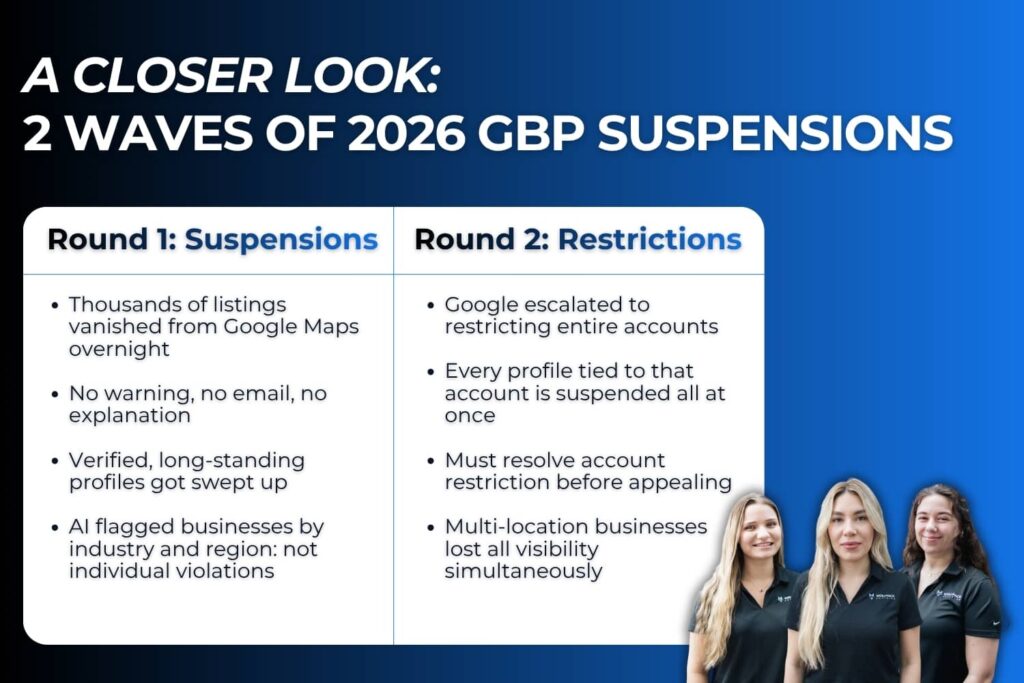
In late April, that enforcement escalated in two distinct rounds.
Round 1: The Listing Sweep (Starting April 27, 2026)
Starting around April 27, thousands of Google Business Profile listings disappeared from Google Maps with no warning and no email notification.
What made this stand out was who got hit. Many suspended profiles were fully verified, had been active for years, and had strong review histories. This was not Google targeting obvious spam.
It was a pattern-based sweep where Google flagged groups of listings based on shared signals like industry category, service area, or recent profile activity.
Round 2: The Account-Level Restrictions (Shortly After)
The second round hit harder. Instead of suspending individual listings, Google began restricting entire Google accounts. When a manager’s Google account gets restricted, every Business Profile tied to that account goes down at the same time.
Some business owners woke up to find every single one of their locations gone at once. Account-level restrictions also require a different process. You have to resolve the account restriction before you can address the individual profiles underneath it.
Both rounds are still affecting small businesses as of May 2026. If you have not checked your profile recently, go do that now.
Why is Google Suspending Business Profiles?
Google Maps has a spam problem. Fake business listings, keyword-stuffed business names, manufactured reviews, and virtual office addresses have been gaming local search for years and pushing legitimate businesses down in the results.
Google Business Profile suspensions usually happen when Google’s automated systems or manual reviews flag your listing for violating quality guidelines. The shift in 2025 and 2026 is that Google stopped relying mostly on manual review and started leaning hard on AI.
The system looks at signals like:
- Whether the business name matches a real legal business name or contains added keywords
- Whether the business address is a real address, a UPS Store, a virtual address, or a P.O. Box
- Whether the profile has unusual edit patterns or recent large-scale changes to business details
- Whether similar profiles in the same industry or region share matching behavior
Google Business Profiles can be suspended for several reasons, including inconsistent information, duplicate listings, policy violations, and suspicious activity. The tradeoff with automated enforcement is that it catches legitimate businesses in the crossfire.
A home inspector who recently updated their service areas, a pest control company that changed their business name, or a roofing contractor who added multiple listings for the same business can all get flagged by the same signals that catch bad actors.
Who Got Hit the Hardest?
Home service businesses are among the most affected categories in this wave. HVAC companies, pest control operators, home inspectors, roofers, plumbers, landscapers, and junk removal businesses all saw elevated suspension rates.
There are a few reasons for this. Most home service businesses operate as service area businesses. They go to the customer instead of having a public-facing storefront. Service area businesses have their own specific requirements on Google, and not meeting them correctly is one of the most common suspension triggers.
Home services is also one of the most heavily spammed categories on Google Maps, so Google’s enforcement pays extra attention to anything that looks off here.
Common triggers for Google Business Profile suspensions include using a P.O. box or virtual address, making multiple changes to key information at once, and being in a high-spam industry.
Beyond the industry itself, certain profile setups carry a higher risk:
| Profile Red Flag | Why It’s a Problem |
| Keywords stuffed into the business name | Google treats this as deceptive content, even if it has been there for years |
| Showing a home address as a service area business | SABs must hide residential addresses unless there is a commercial space with signage |
| Using a virtual office or UPS Store as the business address | Google requires a real address that is staffed during business hours |
| Multiple large edits made in a short window | Triggers a flag for suspicious activity on the account |
| Duplicate listings or duplicate profile entries for the same business | Even old, forgotten duplicates can cause problems |
| Business hours set to 24/7 without actual staffing | One of the more overlooked flags, especially for solo operators |
What Does a Suspended Business Profile Cost You?
A suspended Google Business Profile is not just an inconvenience. For a home service business that depends on local visibility, the impact is immediate.
Here is what happens the moment your profile goes down:
- Your listing disappears from Google Maps and local pack results entirely
- Customers searching for your services in your area cannot find you
- Calls and direction requests from Google drop to zero
- Your reviews still exist on the back end, but no one can see them
- Competitors move up in the local search results to fill the gap while you are gone
Every day your profile is suspended is a day you are invisible to people actively looking for what you offer. For home service businesses where leads come in fast or not at all, that is real revenue sitting on the table.
How to Tell if Your Business Profile Is Suspended
Before you do anything else, confirm what you are actually dealing with.
Step 1: Search your business name on Google Maps. If your listing does not appear, that is your first signal.
Step 2: Log in to your Google Business Profile dashboard at business.google.com. Look for a “Suspended” notice on your profile.
Step 3: Check the email address tied to your Google account for any email notifications from Google.
Step 4: Determine whether this is a listing-level suspension or an account-level restriction. If the manager’s Google account itself is restricted, every profile under it is affected. You have to resolve the account restriction first before working on individual listings.
There are two main types of Google Business Profile suspensions: soft suspensions and hard suspensions. A soft suspension means your listing is still visible on Google, but you have lost the ability to manage it, and your profile details show a suspended status in the dashboard.
A hard suspension means your listing has been completely removed from Google Search and Maps. Both require going through the appeal process, but a hard suspension has a more immediate impact on your digital presence and local visibility.
How to Fix it: Get Your Google Business Profile Reinstated
Reinstatement is usually possible. The key is doing this in the right order. Submitting an appeal before you have actually fixed the underlying issue almost always results in a denial.
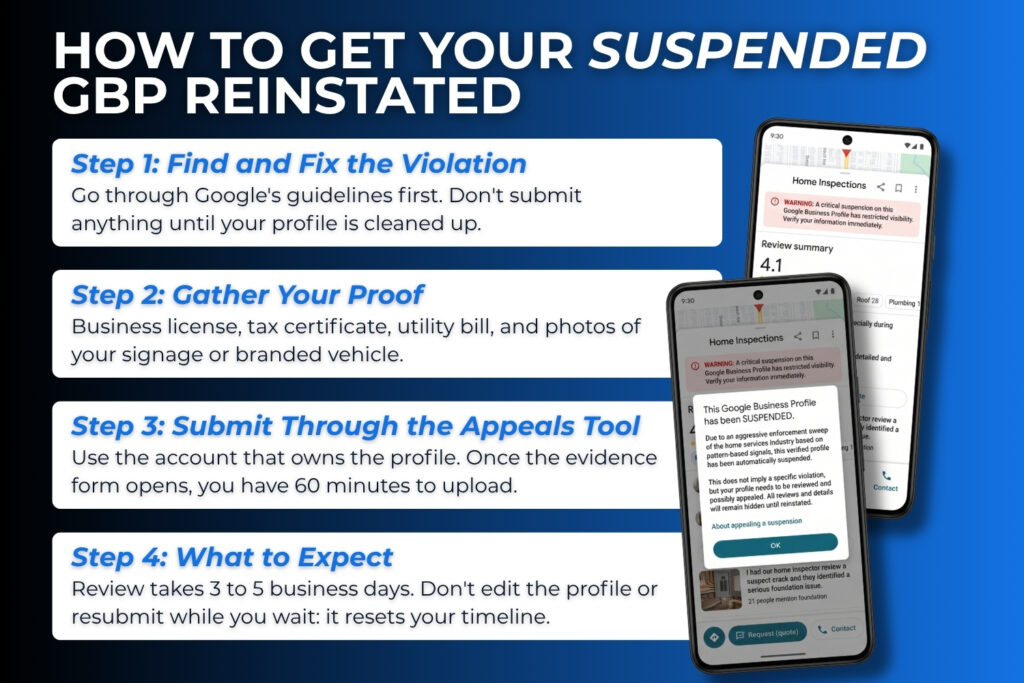
Step 1: Identify the Policy Violation and Fix It
Review Google’s guidelines before you submit anything. Double-check every piece of business information on your profile. Common fixes include:
- Updating your business name so it matches your official business registration and legal business name exactly, with no added keywords
- Hiding your home address if you are a service area business with no public-facing commercial location with signage
- Removing any duplicate listings or duplicate profile entries you may have created over the years
- Making sure your business address is a real address, not a virtual address, coworking space, UPS Store, or P.O. Box
- Ensuring your business hours and business details are accurate and consistent with your website URL and other directory listings
A Google Business Profile must align with Google’s policies for reinstatement, which include ensuring accurate category and hours. Inconsistent information across your website, profile, and other listings is one of the most common reasons an appeal gets denied, even after you think you have fixed everything.
Step 2: Gather Official Proof of the Business
Google will ask you to prove your business is real and that your profile aligns with an actual operating business. Get these together before you start the appeal:
Official proof required to verify a business for a Google Business Profile includes government documents such as a business license or tax registration certificate, utility bills showing the business name and address, and photos of the physical storefront or company vehicle for service area businesses.
Specifically, have ready:
- Business license or official business registration document
- Tax certificate, if available
- Utility bills showing the business name and address
- Photos of your storefront signage, or branded vehicle, and job site photos if you are a service area business
Step 3: Submit Through the Appeals Tool
It is necessary to log in to the Google Business Profile Appeals Tool with the Google account that owns the suspended profile to submit an appeal. Do not use a different account or create a new listing while the appeal is active.
To appeal a Google Business Profile suspension, you must submit your appeal through Google’s Business Profile Appeals Tool, ensuring that you include clear and verifiable documentation to support your case.
Critical note for 2026: Once you open the evidence form, you have 60 minutes to upload your files. If you miss that window, your additional evidence will not attach, and your appeal will likely be denied.
Have everything organized and ready before you open the form.
Keep your appeal message short, professional, and factual. You have a 1,000-character limit. State what the policy violation was, what you changed to fix it, and what documentation you are submitting. Stick to the facts.
When appealing a suspended Google Business Profile, it is crucial to ensure that the business name matches the legal business name and that the address does not include a P.O. Box or virtual office unless required by the business type.
What to Expect After You Submit
Review timelines for Google Business Profile appeals can range from 3 business days to several weeks, and making edits or submitting duplicate appeals while waiting can reset the review wait time. If approved, your listing should reappear within 72 hours. Do not touch the profile while you wait.
If your initial appeal is denied, you can request an additional review by providing new evidence that was not included in your original appeal submission. This additional review is your last self-service option before escalating to a Google Business Profile Product Expert in the Google Help Community.
How to Keep Your Google Business Profile From Getting Suspended Again
Once your profile is back up, the goal is staying out of Google’s crossfire the next time an enforcement sweep runs. Here is what to keep up with:
- Audit your profile quarterly. Check your business name, categories, business address, business hours, and service areas for anything that has drifted out of compliance.
- Keep your documentation current. Your business license, tax certificate, and address verification should always be up to date and accessible.
- Avoid making several large edits at once. If you need to update your business name, categories, and service areas, spread those changes out rather than doing them all in one session.
- Stay consistent across platforms. Your business name, business address, and phone number should match across your website URL, Google profile, and every other directory listing.
- Respond to reviews consistently. Active review management signals to Google that a real business owner or primary owner is maintaining the account.
- Work with someone who monitors this proactively. At WolfPack, GBP profile health is part of what we track for home service clients on an ongoing basis. Catching a small issue before it becomes a suspension is a lot easier than going through the appeal process after the fact.
Related Questions
Can I create a new Google Business Profile if mine gets suspended? No. Creating a new listing while your original is under review will almost always make things worse. Google can detect duplicate profiles and may remove both. Go through the official appeal process instead.
Will my Google reviews be deleted if my profile is suspended? Your reviews are not deleted during a suspension. They still exist and will reappear once your Google Business Profile is reinstated. That is one of the few relieving things about this process.
How long does a Google Business Profile suspension last? It depends on how quickly you act and whether your appeal is approved. Review timelines can range from 3 business days to several weeks. The fastest path is always fixing the underlying issue before you submit your reinstatement request.
Does a suspension affect my website’s Google search rankings? Not directly. Your website’s organic rankings in Google Search are separate from your Business Profile. That said, losing your local pack placement means significantly less traffic and calls, even if your website rankings stay the same.
What if I contact Google directly? You can contact Google through the Google Business Profile Help Community, where Google employees and verified Product Experts can sometimes assist with escalated cases. This is typically the path after an additional review has been denied. Do not rely on it as a first step.
Conclusion
A suspended Google Business Profile feels like someone put a closed sign on your business without asking. But in most cases, it is fixable if you approach it the right way.
Do not panic, create a new listing, or submit an appeal before you have fixed the underlying issue.
Going forward, treat your Google Business Profile like the local SEO asset it is. A little consistent maintenance goes a long way toward keeping your listing clean, your business information accurate, and your local visibility protected.
And if you want a team that already knows the home service space and keeps an eye on this stuff so you do not have to, that is exactly what WolfPack is here for.