Managing franchise SEO means helping all your business locations show up in Google search results without them competing against each other.
The basic steps include setting up separate Google Business Profiles for each location, creating unique content for each location page, deciding who handles what (corporate vs. franchisees), and tracking results for all locations in one place.
It can be trickier than managing SEO for a single business. You need to balance consistency across your brand with customization for each location. But when you get it right, every location can rank well in its local area.
This guide breaks down exactly how to manage SEO across multiple locations in simple, practical steps.
Contents
What Is Franchise SEO?
Franchise SEO is the practice of helping multiple franchise locations rank in search engines for their local areas.
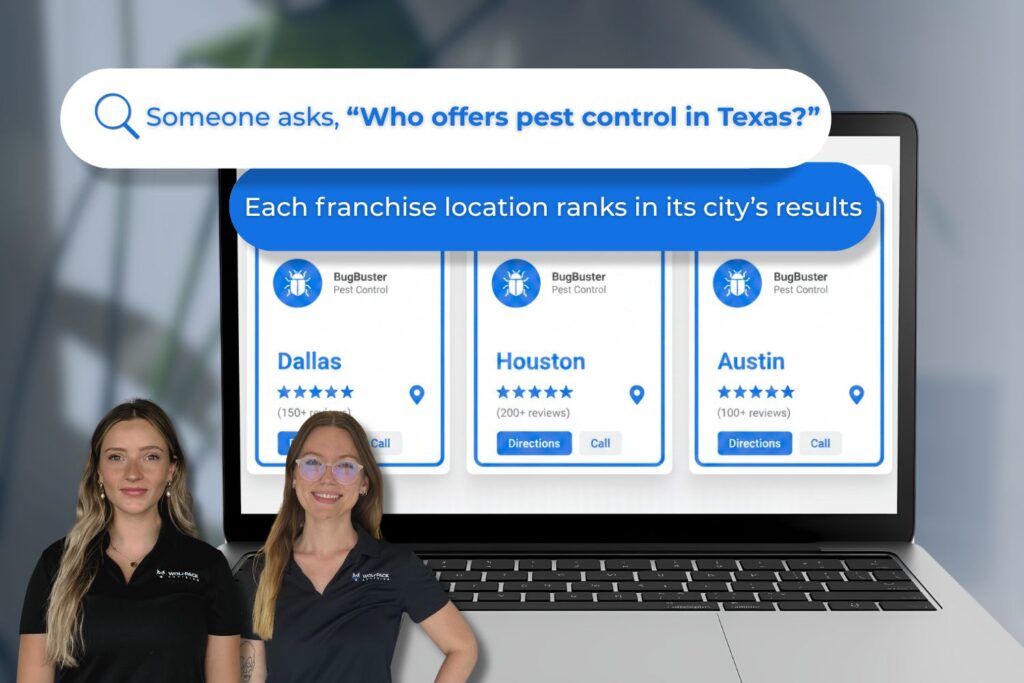
Here’s the challenge: If you run a home inspection franchise with 20 locations, you don’t want your Dallas location competing with your Houston location for the same search terms.
You want each one showing up when someone in their area searches for “home inspection near me” or “home inspector in [city name].”
Traditional SEO focuses on optimizing a single website or company. Franchise SEO requires systems that scale across multiple locations without sacrificing local authenticity.
This matters because most people searching for home services are looking for local businesses nearby. According to Think with Google, 76% of people who search for something nearby visit a business within 24 hours.
If your franchise locations aren’t showing up at all in local search results, you’re losing customers to competitors who are.
Example: A homeowner in Austin searches “home inspector Austin TX.” You want your Austin franchise location to appear in those results, not your San Antonio location (even though both are in Texas and part of the same franchise).
Who Normally Handles Franchise SEO?
There’s no standard way franchises handle SEO. It varies depending on the franchise agreement, company size, and how much independence franchisees have.
Here’s what we typically see:
- Corporate handles everything: Corporate manages the website, location pages, Google Business Profiles, and content. Franchisees have little input. This keeps everything consistent, but can miss local opportunities.
- Franchisees handle it on their own with brand guidelines: Corporate sets basic rules (approved keywords, brand guidelines), but franchisees manage their own local SEO. They update their Google Business Profile, respond to reviews, and create local content.
- Franchisees hire agencies: Some franchise systems let locations hire their own franchise SEO agency. The agency works within corporate’s brand guidelines but manages that location’s SEO strategy.
The most common approach:
- Corporate builds the main website structure
- Corporate sets brand guidelines and SEO strategy
- Franchisees manage their Google Business Profile
- Franchisees handle reviews and local responses
The key is understanding what your franchise agreement allows and what support corporate provides.
The Biggest Franchise SEO Challenge: Duplicate Content
Duplicate content means having the same (or very similar) content on multiple location pages of your website.
This is the number one problem franchises face with franchise SEO.
Here’s what usually happens: Corporate creates one location page template. They copied it for all 50 locations. The only thing that changes is the city name and address. Everything else is identical.
Search engines (or humans) see this and get confused. They don’t know which location to show in search results. Sometimes they pick one at random. Sometimes they don’t rank any of them well.
The fix is simple.
Make your location unique wherever there’s content.
You don’t have to rewrite everything from scratch. Use a template for the basic structure, but customize specific sections for each franchise location.
What to customize on your location page:
- Service area descriptions (mention specific neighborhoods, landmarks, or counties you serve)
- Local team bios or photos
- Local customer testimonials
- Nearby areas served (list actual street names or subdivisions)
- Local events or community involvement
Bad Example
“ABC Home Inspections provides professional home inspection services in [City]. We’ve been serving [City] for over 10 years with thorough, reliable inspections.”
Good Example
“ABC Home Inspections serves Dallas and the surrounding areas, including Plano, Frisco, and Richardson.
Our Dallas team has inspected over 3,000 homes in neighborhoods like Lakewood, Oak Cliff, and Uptown since 2014, and we’re familiar with the issues North Texas homes face.”
See the difference? The second example includes specific local details that make it unique.
| Duplicate Content Approach | Unique Content Approach |
| Same service description for every city | Custom description mentioning local neighborhoods |
| Generic team section | Actual team members at that location |
| No local details | Specific areas served and local expertise |
| Result: Pages compete with each other | Result: Each page ranks for its area |
Creating unique content for each franchise location helps avoid duplicate content penalties and improves your local SEO performance.
Setting Up Google Business Profiles for Each Location
Every franchise location needs its own Google Business Profile. This is non-negotiable if you want to show up in local search results.
Having a verified Google Business Profile increases your chance of appearing in the “Local Pack” on Google Maps at the top of search results. This is prime real estate for attracting local customers.
The basics:
- One profile per physical location
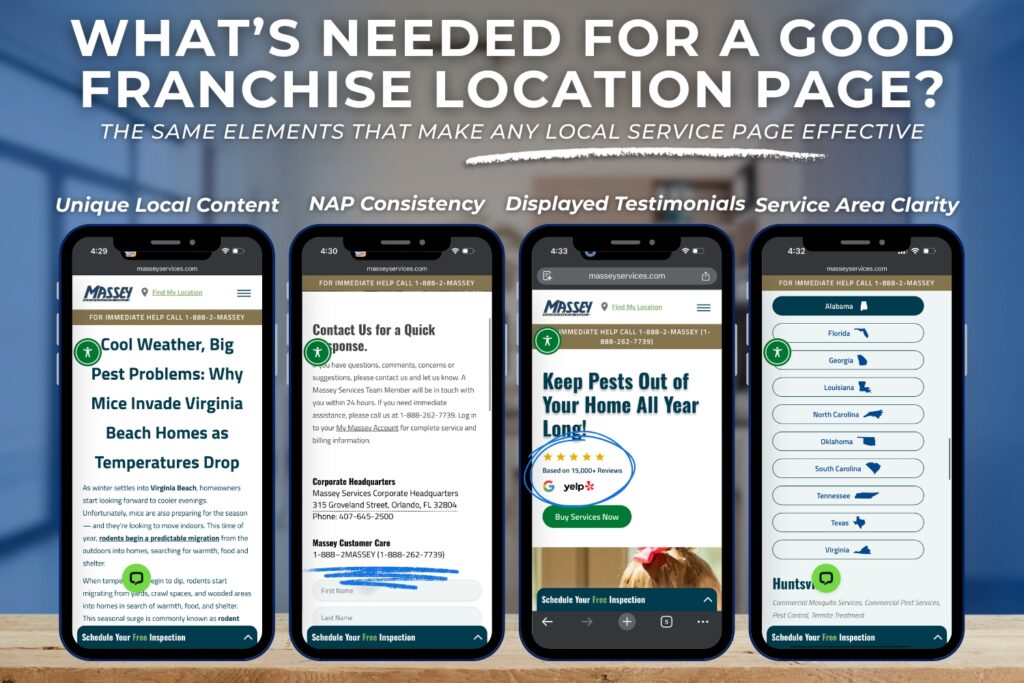
- Correct name, address, and phone number on each
- Information must match exactly across your website, directories, and social media
How to set up multiple profiles:
- Claim or create a profile for each location at business.google.com
- Verify each location (Google sends a postcard with a verification code)
- Fill out every section completely
- Keep information consistent across all profiles
Common mistakes that hurt your local search rankings:
- Using different phone numbers on your website vs. your Google Business Profile
- Forgetting to update hours when they change
- Not responding to reviews
- Using a P.O. Box instead of a physical address
Managing Multiple Profiles
Google offers bulk management tools if you have 10+ locations. You can also use third-party tools like Yext for business listing management.
The most important thing: Keep your Name, Address, and Phone (NAP) identical everywhere it appears online.
List each franchise branch in prominent directories while maintaining strict NAP consistency to improve online visibility.
Pro tip: Include an embedded Google Map on each location page with click-to-call or “Get Directions” buttons to capture mobile users searching for local businesses.
Building Your Franchise Website Structure
Your website structure determines how well each location can rank independently in search engines.
The simple setup that works best:
Use a subfolder structure for location-specific pages under your main domain:
- yourfranchise.com/locations/dallas
- yourfranchise.com/locations/houston
- yourfranchise.com/locations/austin
Or
- yourfranchise.com/dallas
- yourfranchise.com/houston
- yourfranchise.com/austin
Why This Structure Works
Search engines see these as part of your main corporate website, which helps with overall brand authority. But each page can still rank for its specific location.
This approach is better than using separate domains for each franchise location. A single domain consolidates your brand authority and makes franchise marketing easier to manage.
What to include on each location page:
- Location name and address
- Local phone number
- Service area map
- Hours of operation
- Local team information
- Unique content about serving that area
- Customer testimonials from that location
And don’t forget, mobile optimization matters. Over 60% of local searches happen on mobile devices. Your location pages need to load fast and be easy to read on a phone.
Include internal links from your main locations page to each individual location. Link from each location page back to your main service pages.
This helps search engines understand your site structure and helps customers navigate between pages or locations.
How Franchise Locations Should Use Keywords
Keywords work differently depending on what type of page you’re optimizing for franchise SEO.
For Service and Location Pages (Transactional Keywords)
These are the keywords people use when they’re ready to hire someone. Develop a keyword strategy that includes geographic modifiers to connect with high-intent customers.
Target geo-specific keywords such as “service + city” or “near me” phrases. For example, “home inspector Dallas,” “plumbing services Houston,” “HVAC repair Austin.”
When locations CAN share keywords:
If your locations are in different cities or far apart, they can target the same service keywords with different geographic modifiers.
For example:
- Dallas location targets: “home inspection Dallas”
- Houston location targets: “home inspection Houston”
- Austin location targets: “home inspection Austin”
No problem. These locations aren’t competing because they serve different areas.
When locations SHOULD NOT share keywords:
If you have multiple locations in the same city or very close together, they’ll compete with each other.
The fix: Use more specific local keywords.
- North Dallas location targets: “home inspection Plano”
- Downtown Dallas location targets: “home inspection Oak Cliff”
| Your Situation | Keyword Approach |
| Locations in different cities | Each uses city name keywords |
| Multiple locations in same city | Use neighborhood or district names |
| Locations very far apart | Can share base keywords with modifiers |
For Blog Posts (Informational Keywords)
These are keywords people use when researching or learning. Examples: “how to prepare for a home inspection,” “what does a plumber check,” “signs you need HVAC repair.”
When blog content for your location lives on its own individual page (yourfranchise.com/location/blog), your location’s posts live totally separately from corporate and the other locations.
When locations CAN share blog keywords:
Multiple franchise locations can write about the same informational topics on their respective pages, but keywords need to change to ensure the posts aren’t competing against each other.
For example:
- Dallas location writes: “How to Prepare for a Dallas Home Inspection” at yourfranchise.com/dallas/blog
- Houston location writes: “How to Prepare for a Houston Home Inspection” at yourfranchise.com/houston/blog
- Austin location writes: “How to Prepare for an Austin Home Inspection” at yourfranchise.com/austin/blog
This works because each blog post lives on a different location page. Searchers who find these posts will see they’re from their local franchise location and are more likely to convert.
Finding Blog Keywords
Not every keyword is worth targeting. When planning your franchise blog strategy, check:
- Search volume: How many people search for this keyword each month? Aim for keywords with at least 200-500 estimated monthly searches to make the effort worthwhile.
- Keyword difficulty (KD): How hard is it to rank for this keyword? Lower difficulty scores (0-30) are easier for newer franchise locations to rank for. Higher scores (50+) mean you’re competing with established sites.
Use free tools like Google Keyword Planner or paid tools like Ahrefs or SEMrush to research keywords before creating content.
When to add local keywords to blog topics:
Add location-specific keywords when the topic has a genuine local angle.
- “Protecting Your Dallas Home From Foundation Issues” (local concern)
- “Houston Hurricane Season Home Maintenance” (regional weather)
- “Common Austin HVAC Problems in Summer” (climate-specific)
These localized blog keywords help you rank for area-specific searches while providing relevant value to local customers.
Managing Customer Reviews and Local Authority
Reviews are crucial for franchise SEO. Online reviews significantly influence local search rankings and customer trust. Search engines use reviews as a ranking factor for local search results.
How most franchises handle reviews:
- Corporate provides templates or systems for requesting reviews
- Each location sends requests to its own local customers
- Reviews go to that location’s Google Business Profile
- Franchisees respond to their own reviews
Local Authority Through Link Building:
Earning links from local-specific sources helps build authority for individual franchise locations:
- Sponsor local sports teams or charities with links back to your franchise location page
- Partner with other local businesses for cross-promotion
- Get listed in local chambers of commerce and business associations
- Encourage franchisees to post about local community news and local events
Responding to Reviews
Create templates that save time, but customize them with specific details so they don’t sound robotic.
- Template for positive reviews: “Thanks for choosing [Location]! We’re glad [specific thing they mentioned] worked out well.”
- Template for negative reviews: “We’re sorry about [specific issue]. Please contact us at [phone] so we can make this right.”
Address negative reviews quickly. One bad review with a good response is better than one bad review ignored.
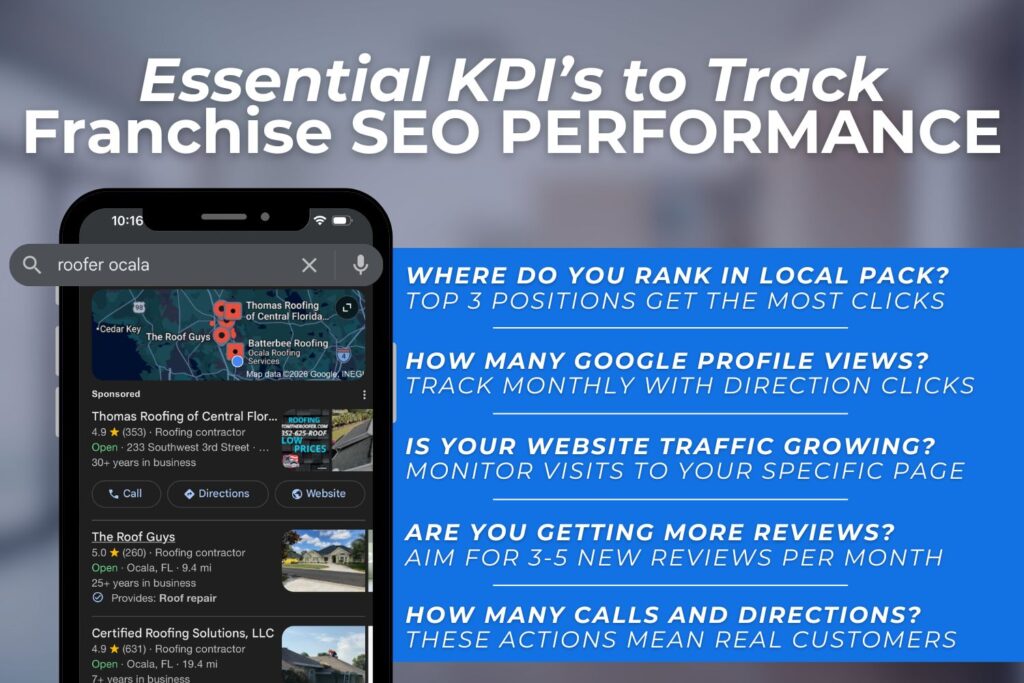
Tracking Your Franchise SEO Results
Track SEO performance for all locations without overcomplicating it.
Key performance indicators (KPIs) that matter:
- Local pack rankings (where you show up in map results)
- Google Business Profile views
- Website traffic by location
- Calls and direction requests
- Organic traffic from search engines
Basic tools you need:
- Google Analytics (free) – tracks website traffic
- Google Search Console (free) – shows keyword performance
- Google Business Profile Insights (free) – shows views and actions
- Local rank tracking tool (paid) – tracks local search rankings
Simple monthly check-in for each location you manage:
- Check top 5 keyword rankings
- Review Google Business Profile stats
- Look at website traffic trends
- Count new reviews
- Monitor the local listings’ accuracy
Create a simple tracker in Google Sheets with these metrics for each location you manage.
If that’s just one location, your task is much simpler!
| Location | Top Keyword Rank | GBP Views | Website Visits | New Reviews |
| Dallas | Position 3 | 1,240 | 340 | 8 |
| Houston | Position 5 | 890 | 210 | 5 |
Conduct regular audits of franchise location pages to ensure they’re optimized and free of errors. Check for broken links, outdated information, and NAP consistency across all local listings.
Common Franchise SEO Mistakes
- Using identical content for every location: Even small changes make a difference. Customize at least 30% of each location page with local information to improve franchise SEO success.
- Not communicating between corporate and franchisees: Have regular check-ins and clear guidelines so everyone knows what’s expected. Maintaining consistent branding across all franchise locations helps build trust and improve search engine rankings.
- Neglecting Google Business Profiles: Keep hours current, add photos regularly, and respond to reviews. Active profiles rank better in local search.
- Making it too complicated: Keep your franchise SEO strategy simple. Focus on unique content, accurate listings, and good reviews.
Quick checklist of what NOT to do:
- Copy and paste the same content for all locations
- Use the same phone number for multiple locations
- Let franchisees create their own separate websites
- Ignore negative reviews
- Target the same keywords when locations are close together
Related Questions
Can I do franchise SEO myself?
Yes, if you have the time. The basics like setting up Google Business Profiles, creating unique location pages, and managing reviews don’t require technical expertise. Managing 3-5 locations yourself is doable. Beyond that, most franchises hire help or bring in franchise SEO services as they grow.
How long before I see results?
Expect 6 to 9 months for noticeable improvements in local search rankings. Google Business Profile optimizations show results faster (4 to 8 weeks), while major website changes take longer (12+ months). Consistent effort matters more than quick fixes.
What’s more important for franchise SEO: Google Business Profile or website optimization?
Both matter, but Google Business Profile optimization and verification typically deliver faster results. It directly impacts your local pack rankings and map visibility.
Should each franchise location have its own blog?
It depends on your franchise structure. If locations operate independently with separate websites or site sections, each should maintain its own blog targeting local keywords. If all locations share one main site, keep the blog centralized to avoid duplicate content issues.
Conclusion
Managing franchise SEO doesn’t have to be overwhelming. Start with these three priorities:
- Establish clear roles between corporate and franchisees
- Set up and optimize Google Business Profiles for the location you manage
- Create unique content for your location’s service pages and blog
You don’t need to do everything at once. Pick one location to perfect first, then apply what you learned to the others. The franchises that succeed with local SEO share one thing: consistency.
Need help managing franchise SEO across your franchise locations? Get in touch with the WolfPack team today for a quick, no-pressure strategy call.