


Last updated on April 10th, 2026 at 07:42 am
A SEO workflow is a repeatable, step-by-step process that turns your search engine optimization efforts from guesswork into a structured system. It connects keyword research, content creation, technical SEO, link building, and performance tracking into one coordinated cycle.
Most small business owners know SEO matters. They’ve heard they need to blog, optimize pages, and show up in search results. But knowing what to do and having a process to do it are two very different things. That’s the gap a SEO workflow fills.
Without one, SEO becomes a scattered list of one-off SEO tasks. A blog post here. A meta title change there. Maybe some keyword research when you remember. But none of it connects. And none of it compounds into organic traffic growth.
A structured SEO workflow process changes that. It gives every task a purpose, a sequence, and a way to measure whether it’s working. According to a 2026 report from First Page Sage, a content-driven SEO campaign can deliver a 748% return on investment over time. But that kind of result doesn’t come from random effort. It comes from a process you can repeat.
This guide walks you through how to create a SEO workflow that’s simple enough to follow and strong enough to drive real results for your business.
Why Most Businesses Get Stuck Without a SEO Workflow Process
Most businesses don’t fail at SEO because they’re doing the wrong things. They fail because they’re doing the right things inconsistently, without a defined SEO process to keep things on track.
Here are some of the most common patterns we see when new clients come to WolfPack for a SEO audit:
- No keyword strategy. New content gets published based on gut feeling instead of keyword data or search intent.
- Inconsistent publishing. The blog goes quiet for months, then gets a burst of posts that don’t connect to a larger SEO strategy.
- Ignoring existing content. Old pages never get refreshed, even when content gaps and outdated information start dragging down search rankings.
- Skipping technical issues. Site speed problems, broken links, and indexing errors go unnoticed until keyword rankings drop.
- No tracking in place. There’s no way to tell which pages drive organic traffic and which are wasting space.

The fix isn’t doing more SEO. It’s building a structured system around the SEO efforts you’re already making.
How to Create a SEO Workflow Step by Step
You don’t need a complicated system. You need a clear one. Below is a straightforward SEO workflow process that covers the core elements most small businesses and home service companies need. Each step builds on the one before it, creating a cycle where SEO strategy informs execution, execution feeds data, and data sharpens strategy again.
Step 1: Start With Keyword Research
Every SEO workflow begins with keyword research. Before you create any new content or optimize a single page, you need to know what your audience is actually searching for.
For a pest control company in Tampa, that might mean targeting phrases like “termite inspection Tampa” or “mosquito control near me.” For a roofing contractor, it could be “roof repair in [city name]” or “emergency roofer [county].”
Here’s a simple process to follow:
- List your core services.
- Add your service areas (cities, counties, neighborhoods).
- Use a keyword research tool like Google Keyword Planner, Ubersuggest, or Semrush to check search volume and keyword difficulty.
- Run a competitor analysis to see which keywords similar businesses already rank for and where gaps exist.
- Pick keywords with clear search intent and reasonable competition.
- Organize keyword data by topic cluster to identify content gaps and uncover keyword insights you might have missed.
Group related keywords together using topic clustering. This helps you plan content that covers a subject thoroughly rather than creating isolated blog posts that compete with each other. The goal is to match what your customers are searching for with what you actually provide.
Step 2: Plan New Content and Refresh Existing Content
Once you have your keywords, turn them into a content plan. This is where brief creation comes in. A content brief acts as the contract between your SEO strategy and your content creation process, making sure every page targets the right keywords, matches search intent, and fills real content gaps.
Your content plan should cover two tracks:
- New content creation: Use your keyword research and content research to identify topics your site doesn’t cover yet. Each blog post, service page, or FAQ should map to a specific keyword cluster.
- Content optimization of existing content: Audit what you already have. Look for pages with declining organic traffic, outdated information, or missing optimization. Refreshing existing content is often faster than creating new content from scratch and can deliver quick ranking gains.
You don’t need a massive content calendar. Even one well-optimized post per month can move the needle. Many SEO teams use simple content calendars in a Google Sheet or project management tool to stay consistent. AI tools like ChatGPT can also help generate content ideas and draft outlines, though human review is always essential.
| Month | Topic | Target Keyword | Content Type |
| January | How often to service your HVAC | “HVAC maintenance schedule” | Blog post |
| February | Signs you need a new roof | “roof replacement signs” | Blog post |
| March | What to look for in a home inspector | “home inspection tips” | Blog post + FAQ |
Step 3: Optimize Every Page Before You Publish
This is where most businesses leave easy wins on the table. Before any page goes live, it should hit a short list of on-page optimization basics. This step of your SEO workflow process ensures that every piece of content is set up to perform in search results from day one.
On-Page SEO Checklist:
| Element | What to Do |
| Meta titles | Include your primary keyword naturally. Keep it under 60 characters. |
| Meta tags / descriptions | Write a clear, click-worthy summary under 155 characters. |
| H1 heading | Use your keyword naturally in the main heading. |
| H2/H3 headings | Break content into scannable sections with descriptive subheadings. |
| Internal linking | Link to at least 2 to 3 related pages on your own site. Strong internal linking strengthens your site’s structure and helps search engines understand page relationships. |
| Image alt text | Describe each image using natural language and keywords where relevant. |
| URL slug | Keep it short, readable, and keyword-focused. |
| Schema markup | Add schema markup (FAQ, LocalBusiness, HowTo) where applicable to improve visibility in search results. |
This checklist takes five minutes. But it’s the difference between a page that ranks and a page that sits on page four of Google.
Step 4: Handle Technical SEO
Technical SEO is the behind-the-scenes work that makes everything else function properly. You don’t need to become a developer. But you do need to make sure the basics are covered so that high-quality content doesn’t underperform due to technical issues.
Here’s what to keep on your radar:
- Site speed. Slow pages lose visitors and search rankings. Use Google PageSpeed Insights or GTmetrix to check your load time.
- Mobile usability. More than half of all web traffic comes from mobile devices. Your site needs to look and work great on a phone.
- Indexing. If Google can’t find your pages, they won’t rank. Google Search Console will tell you if any pages are missing from the index.
- Broken links. Dead links hurt user experience and send bad signals to search engines. Regular audits using tools like Screaming Frog or Google Search Console help catch and fix these.
- Crawl errors. Critical issues like redirect chains, duplicate content, or missing sitemaps can quietly limit your SEO performance.
At WolfPack, technical SEO is part of every client engagement. We use SEO tools like SEMrush, Google Search Console, PageSpeed Insights, and GTmetrix to identify and fix structural issues that quietly hold sites back.
Step 5: Build Authority With Link Building
Link building is the process of earning backlinks from other websites to yours. Search engines treat these links as votes of confidence, and they remain one of the strongest ranking signals.
For small businesses, focus on:
- Local citations. Make sure your business is listed accurately on directories like Google Business Profile, Yelp, and industry-specific platforms.
- Content-driven links. When you create helpful, original content (guides, data, how-to posts), other sites are more likely to link to it.
- Strategic outreach. Building links through partnerships, guest posts, or local business networks can steadily grow your domain authority.
You don’t need to become one of the top link builders overnight. Even a few quality backlinks per month, earned through consistent content creation and outreach, will compound over time.
Step 6: Track Performance Data and Adjust Monthly
A SEO workflow without tracking is like driving with your eyes closed. You need performance data to know what’s working, what’s not, and where to focus next.
At minimum, set up these two free tools:
- Google Search Console tracks which keywords are driving impressions and clicks, plus indexing status and technical issues.
- Google Analytics shows organic traffic patterns, user behavior, and conversions.
Once a month, check:
- Which pages are gaining or losing organic traffic
- Which keyword rankings are climbing or dropping
- Whether new content is getting indexed
- How visitors are engaging with key pages
This doesn’t need to take more than 30 minutes. But it gives you the actionable insights you need to make smart decisions about what to create, update, or fix next.
At WolfPack, we send quarterly video reports and meet with clients to review performance data together. That kind of feedback loop is what separates businesses that plateau from those that keep climbing. Every client gets access to the WolfPack Lead Center to track real leads and real ROI. Not vanity metrics.
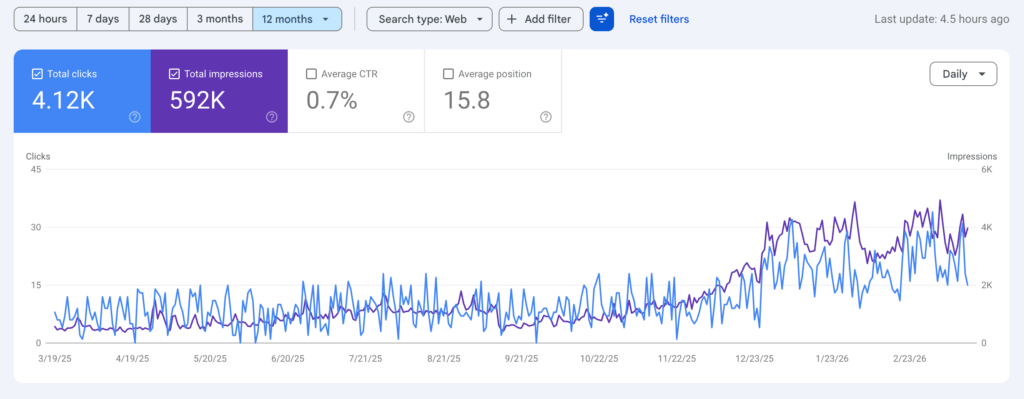
The screenshot above shows real 12-month Google Search Console results from one of our clients. Notice how both clicks and impressions trend upward over time, especially in the later months. That’s the compound effect of a consistent SEO workflow process in action.
How SEO Automation Tools Can Streamline Your Workflow
One of the biggest advantages of a defined SEO workflow process is that many repetitive tasks can be automated, saving time and reducing human error.
Here’s where SEO automation makes the most impact:
| Task | Automation Tools | How It Helps |
| Keyword research | Semrush, Ubersuggest, Ahrefs | Process keyword data faster and surface content gaps automatically |
| Site audits | Screaming Frog, SEMrush | Automated site audits catch technical issues and broken links without manual crawling |
| Rank tracking | SE Ranking, Semrush, Ahrefs | Monitor keyword rankings across locations and devices automatically |
| Content optimization | Surfer SEO, Clearscope | Score and optimize content against top search results in real time |
| Internal linking | Link Whisper, Yoast | Automated internal linking suggestions strengthen site structure |
| Reporting | Google Looker Studio, SEMrush | SEO report automation eliminates repetitive tasks and delivers performance data on schedule |
| Project management | Monday.com, Asana, Trello | Centralized project management gives real-time visibility into SEO tasks |
The right tools won’t replace your SEO strategy. But automation tools handle the repetitive tasks so that you and your SEO teams can focus on strategic planning, content research, and the creative work that actually moves the needle. SEO automation is ultimately about saving time on repetitive tasks so you can invest that time in producing better SEO content and sharing information that genuinely helps your audience.
You don’t need all of these. Different tools serve different needs, and most small businesses can start with just three or four. Pick the right tools for your biggest bottlenecks and build from there.
How to Keep Your SEO Workflow Running Long Term
Building a SEO workflow is the first step. Sticking with it is the real challenge. SEO is a continuous cycle of improvement, not a one-time project.
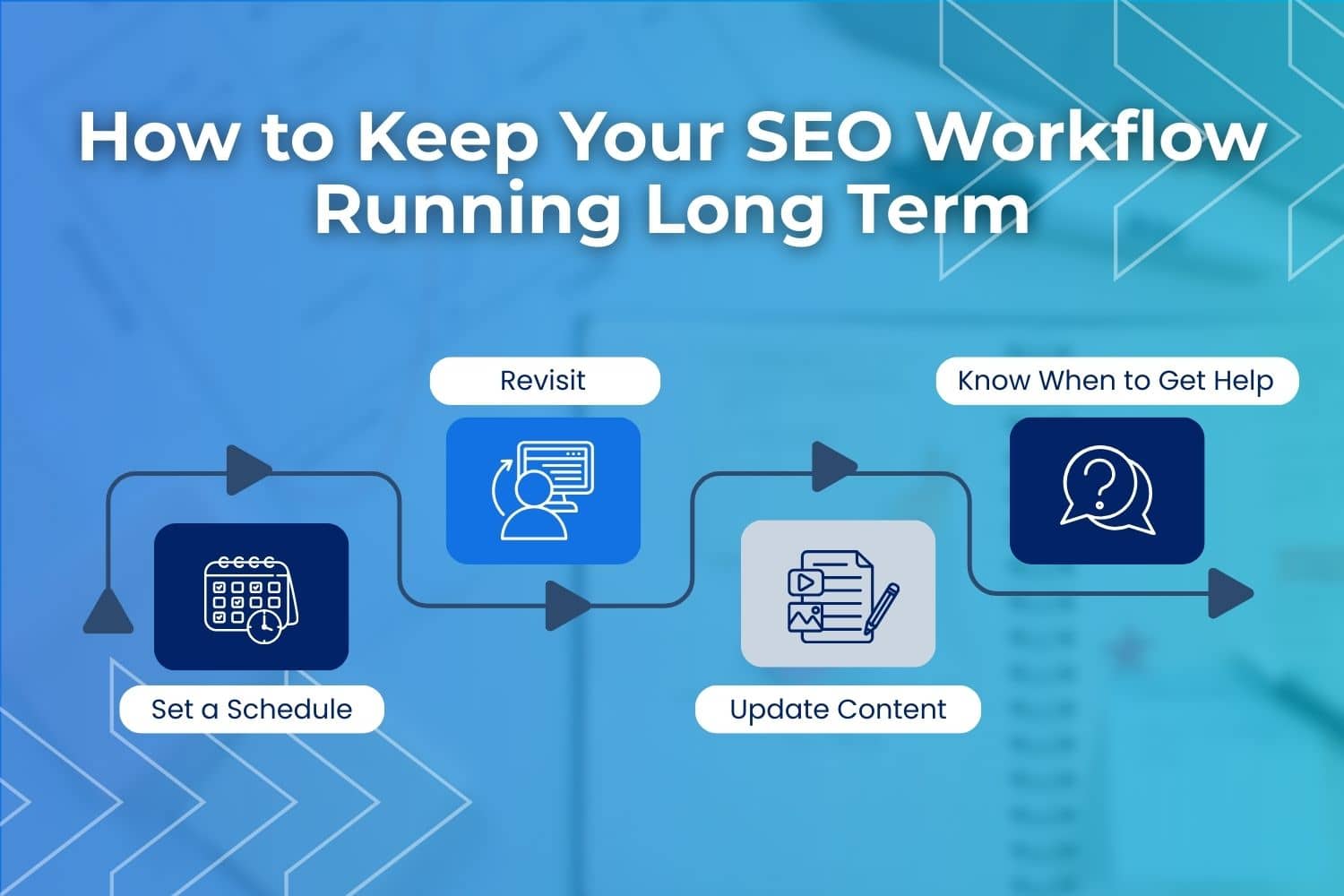
- Set a schedule. Block time on your calendar for SEO tasks, even if it’s just two hours a month. Consistency beats intensity.
- Revisit your workflow quarterly. Search trends shift. Your services might expand. New competitors show up. Check your SEO process every few months and optimize it based on what the data tells you.
- Don’t ignore existing content. Some of your best-performing pages may start to slip over time. Content optimization through updated stats, better internal linking, and fresh examples can bring old pages back to life and close content gaps.
- Know when to get help. Most business owners reach a point where managing SEO on their own becomes a bottleneck. If repetitive tasks and SEO campaigns are pulling you away from running your business, it may be time to partner with a SEO agency that does this every day.
Related Questions About SEO Workflows
Do small businesses really need a SEO workflow?
Yes. Small businesses benefit from a SEO workflow even more than large companies because they have less time and fewer resources. A defined SEO process prevents wasted effort and makes sure every piece of content creation serves a purpose. Whether you run an HVAC company, a home inspection business, or a landscaping crew, having a repeatable workflow keeps your website working for you even during your busiest seasons.
What is the difference between a SEO strategy and a SEO workflow?
A SEO strategy is your overall plan. It defines your goals, target keywords, and competitive approach. A SEO workflow is how you execute that plan. It’s the step-by-step process you follow to create content, optimize pages, handle technical SEO, build links, and track performance data. Think of your strategy as the “what” and your workflow as the “how.” Businesses that invest in both tend to see stronger organic traffic growth and more consistent search rankings over time.
Can I manage my own SEO workflow or should I hire an agency?
You can absolutely start managing your own SEO workflow, especially with the steps outlined in this guide. Many business owners handle the basics like blogging, on-page optimization, and Google Search Console monitoring themselves before eventually partnering with a SEO agency for more advanced support like local SEO, AEO, link building, content optimization, and technical audits. The right time to bring in help is when SEO tasks start pulling you away from running your business or when you need specialized expertise in areas like marketing automation or paid advertising to complement your organic efforts.
Start Building Your SEO Workflow Today
A SEO workflow doesn’t need to be complicated. It needs to be clear, consistent, and connected to your actual business goals.
Start with keyword research. Plan content around real customer questions. Optimize every page before it goes live. Handle the technical basics. Build authority through link building. And track your results so you know what’s working.
That’s the foundation. When you follow this SEO workflow process consistently, you create a system where every SEO effort compounds over time, driving more organic traffic, stronger search rankings, and better leads.
If building or managing a SEO workflow feels like more than you can take on right now, that’s exactly the kind of thing our team handles every day. WolfPack Advising works with home service companies, contractors, and growing businesses to create SEO systems that deliver real, trackable results.