

Last updated on March 19th, 2026 at 10:46 am
The best examples of CRM workflows that double conversions include instant lead response automation, structured follow-up sequences, and post-service nurture campaigns. When built correctly, these systems respond faster, stay consistent, and turn more inquiries into booked jobs.
If you run a home service business, you do not need more leads. You need better follow-up.
Let’s break down how it works.
Contents
Why CRM Workflows Matter for Home Service Businesses
If your phone rings but no one answers, that lead is gone. If someone fills out a form and waits six hours for a reply, they already called your competitor.
Most home service companies lose leads because of slow response and inconsistent follow-up, not because of bad marketing. A CRM workflow fixes that by ensuring no lead falls through the cracks.
What Happens Without Automation
- Leads sit in an inbox.
- Sales reps forget to follow up.
- No reminders are set.
- Past customers are never contacted again.
In many CRM audits, response times are often delayed before automation. After implementation, booking rates tend to increase across all service categories because faster response times make a measurable difference.
What Is a CRM Workflow and How Does It Work
A CRM workflow is an automated sequence of actions triggered by customer behavior.
Simple example:
- Someone fills out your contact form
- Your system sends a text instantly
- An email follows with a booking link
- A task is assigned to your sales rep
- Reminders are sent if they do not book
That is a workflow.
CRM Software vs CRM Automation
Think of your CRM as a digital address book—it’s great for storage, but it doesn’t “do” anything on its own. CRM workflows are the engine that turns that data into revenue by automating your communication and follow-up.
The Rule of Thumb: A CRM stores your contacts; a CRM workflow moves them toward a sale.
How a High-Converting Workflow Functions
Most systems operate on a simple “If-This-Then-That” logic consisting of three core parts:
- The Trigger: An event that starts the process (e.g., a homeowner fills out your website form).
- The Action: The immediate task the system performs (e.g., sending an instant “We’re on it!” SMS).
- The Condition: The logic that determines the next move (e.g., if no appointment is booked within 24 hours, then send a follow-up reminder).
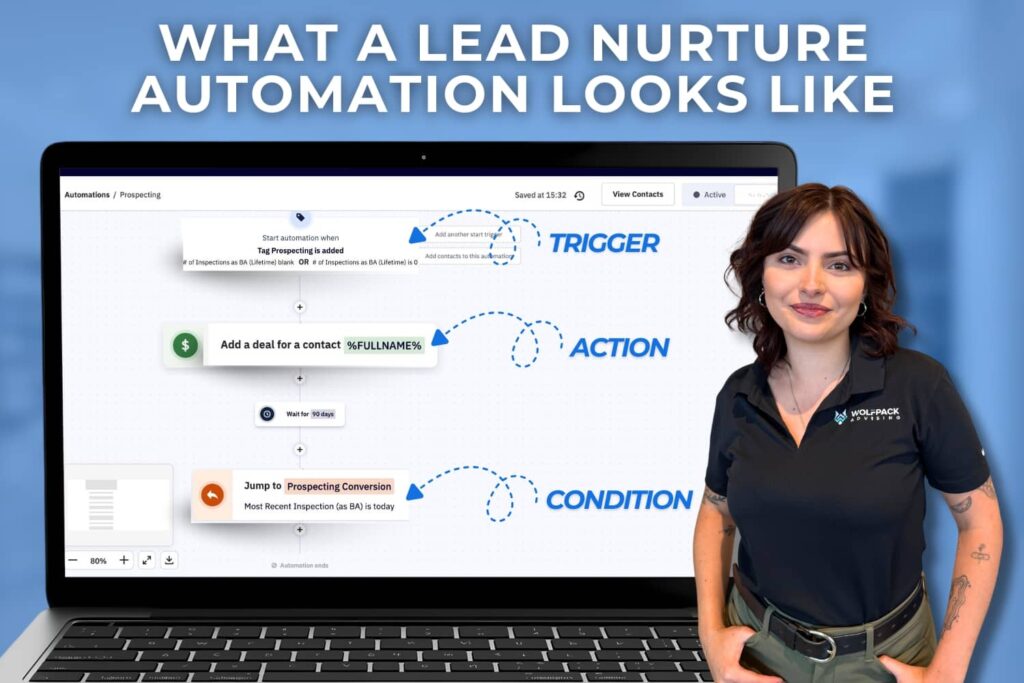
Individually, these steps are basic. However, when you layer them properly, they create a “safety net” that prevents leads from falling through the cracks. This systematic approach is often the difference between a lead that goes cold and a booked job.
CRM Workflows That Turn More Leads Into Bookings
Now let’s walk through the three workflows that produce measurable results.
Example 1: Automated Lead Response That Books More Jobs
The Problem
A homeowner fills out a form at 8:12 pm. Your office opens at 8 am. By then, they’ve already booked someone else.
The Workflow Structure
Here is how the automation should look inside your CRM:
Trigger
Website form submission or Facebook Lead Ad submission
Actions
- Instant SMS confirmation
- Instant email with scheduling link
- Task assigned to sales rep
- Reminder text if no booking within 24 hours
- Final follow-up at 72 hours
You can build this inside platforms like ActiveCampaign or HubSpot using automation builders.
Why It Doubles Conversions
- Speed builds trust
- High-intent leads get immediate attention
- Less manual effort means more consistency
In many service businesses, reducing response time from hours to just a few minutes leads to a noticeable increase in booked estimates. When leads receive immediate confirmation and clear next steps, they are far more likely to schedule.
This type of workflow often creates one of the most significant improvements in overall conversion performance.
Example 2: Follow-Up Sequences That Revive Cold Leads
The Problem
You sent an estimate. They said they would “think about it,” and then… silence. Most contractors stop here, but homeowners need reassurance.
The Workflow Structure
Here is a simple follow-up cadence:
| Timing | Message Focus | Purpose |
|---|---|---|
| Day 1 | Thank you message with estimate summary | Reinforces professionalism and confirms next steps |
| Day 3 | Creates urgency and encourages decision-making | Builds trust and provides social proof |
| Day 7 | Availability reminder | Creates urgency and encourages decision making |
| Day 14 | Helpful FAQ addressing common concerns | Handles objections and reduces hesitation |
This works because decisions take time.
Why It Doubles Conversions
- Repetition increases trust
- Objections are addressed naturally
- Your company stays top of mind
Data from marketing studies shows that 80 percent of sales require five or more follow-ups. Most businesses stop after one or two.
That gap is your opportunity.
If you are building a local authority, this also supports your review strategy and local SEO efforts by reinforcing trust signals.
Example 3: Post Service Nurture That Drives Repeat Business
The Problem
Most contractors disappear after collecting the check. This is an expensive mistake: acquiring a new customer costs 5x more than keeping an existing one. If you aren’t staying top-of-mind, you’re handing your hard-earned clients to the competition.
The “Stay Top-of-Mind” Workflow Structure
Your CRM should turn a single invoice into a lifetime relationship through a multi-channel sequence:
- Immediate (The Gratitude Gap): Send an automated “Thank You” SMS with a link to your Google Profile.
- Goal: Boost local SEO while the experience is fresh.
- 30 Days Later (The Quality Check): A quick “How is everything holding up?” check-in.
- Goal: Catch minor issues before they become bad reviews.
- 90 Days Later (The Value Add): An educational email with a seasonal tip (e.g., “Prepping your AC for summer”).
- Goal: Build authority, not just sales.
- 1 Year Later (The Revenue Trigger): An automated annual inspection or service reminder.
- Goal: Secure repeat bookings effortlessly.
Industries Where This Is a Goldmine
This workflow is the “secret sauce” for high-frequency or maintenance-heavy trades:
- HVAC & Plumbing: Annual inspections and filter changes.
- Roofing: Post-storm season check-ups.
- Pest Control & Lawn Care: Seasonal treatment reminders.
Why It Doubles Conversions
By automating your retention, you aren’t just winning one job; you are building an asset.
- Compounding Growth: Every job you finish adds to a pool of “warm” leads that book automatically every year.
- Referral Velocity: Happy, nurtured customers are 3x more likely to refer neighbors.
- Profitability: According to industry research, increasing customer retention by just 5% can skyrocket profits by 25% or more.
Retention is often ignored in favor of new lead generation. Smart CRM workflows handle both.
How Customer Journey Analysis Improves Business Performance
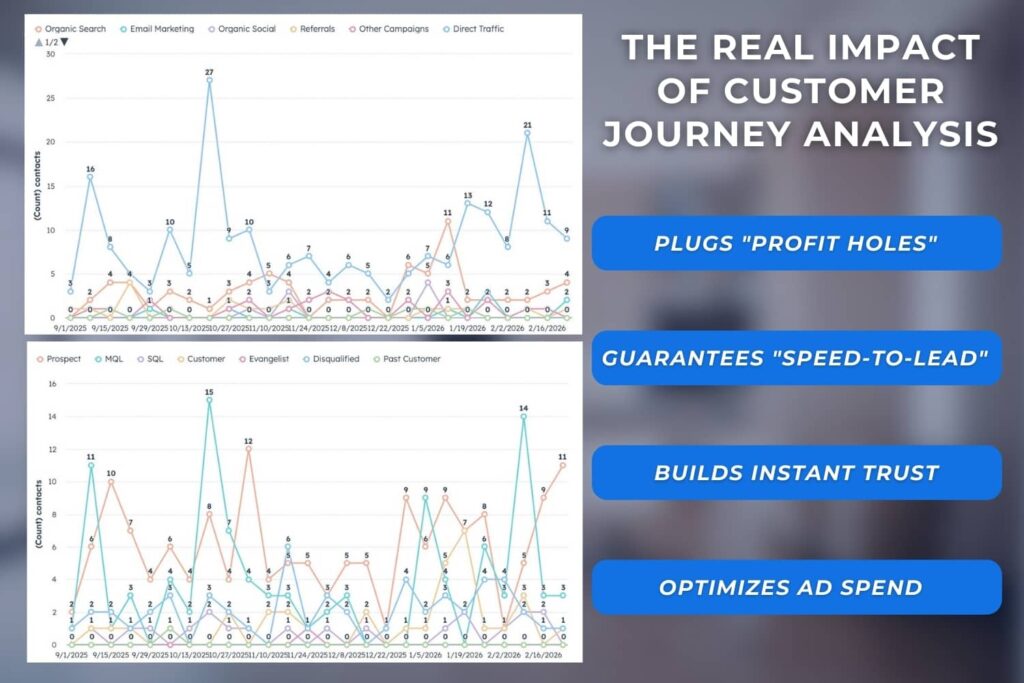
Understanding the customer journey helps businesses see how leads move from the first interaction to a completed job. By analyzing each step, companies can identify gaps, improve response times, build stronger trust, and make smarter marketing decisions.
Plugs “Profit Holes”
- Identifies where potential customers drop off so businesses can fix gaps that lead to lost sales.
Guarantees “Speed-to-Lead”
- Ensures new leads receive fast responses through automation, increasing the chances of winning the job.
Builds Instant Trust
- Automated updates and clear communication help create a professional and reliable customer experience.
Optimizes Ad Spend
- Shows which marketing channels generate real customers so businesses can focus their budget on what works.
How to Choose the Right CRM for Your Workflow Strategy
Not all CRMs are built the same.
If your goal is automation and higher conversion rates, look for:
- A strong automation builder
- Built-in or integrated SMS and email
- Easy form and lead capture integration
- Clear reporting and tracking
- Room to scale as your business grows
Four platforms often considered by home service businesses are ActiveCampaign, HubSpot, GoHighLevel, and Zoho
Each offers different strengths depending on how you manage leads, follow up, and sales. Let’s compare them to see which may fit your workflow strategy best.
CRM Comparison for Home Service Businesses
Below is a simplified comparison to guide your decision.
| Feature | Active Campaign | HubSpot | GoHighLevel | Zoho |
|---|---|---|---|---|
| Automation Strength | Elite (core strength) | Strong, but tier-dependent | Strong “all-in-one” automation + funnels | Agencies/service businesses that want an all-in-one + funnels/white-label |
| Ease of Setup | Moderate learning curve | Beginner-friendly UX | Moderate learning curve | Moderate; powerful but can feel “busy” |
| SMS Capabilities | Via add-ons/integrations | Add-ons (depends on hub/tier) | Built-in SMS + conversations | Via integrations/extensions (varies by setup) |
| Sales Pipeline Tools | Available (lighter CRM) | Strong built-in pipelines | Built-in pipelines | Strong pipelines + modules |
| Marketing Tools | It can get expensive at higher tiers | Full suite (marketing/sales/service/CMS) | Funnels + landing pages + automation | Broad suite (Zoho apps ecosystem) |
| Best For | Automation-first teams who want maximum follow-up performance | Teams who want everything connected (and visibility across the journey) | Generally simpler than enterprise CRMs; “a jack of all trades” | SMBs who want “Salesforce-like breadth” at a more approachable cost |
| Pricing Flexibility | Strong value scaling | Generally simpler than enterprise CRMs; “a jack of all trades.” | Often flat-ish plans; value depends on use case | Generally cost-effective for feature depth |
| UI / Day-to-day feel | Clean enough, built around automations | Polished, modern, very usable | Moderate; powerful but can feel “busy.” | Powerful but can feel clunky to some users (similar “enterprise CRM” vibe) |
Which CRM Platform is Right for Your Workflow Strategy?
Identifying the right workflows for your business is only half the battle. The real challenge is turning those strategies into a system that actually runs your marketing, follow-ups, and customer communication.
That is where many service businesses get stuck. Most CRM platforms are powerful, but they are not designed to be plug-and-play. Without the right setup, automation workflows, and integrations, the software often becomes underused or overly complicated.
ActiveCampaign: The Automation Specialist
ActiveCampaign is widely known for its powerful automation capabilities, especially for businesses that rely heavily on email and SMS follow-up sequences.
The Pro
- One of the most advanced visual automation builders available, allowing flexible “if/then” logic and detailed customer journey workflows.
The Con
- It is not an all-in-one platform. Features like landing pages, call tracking, or funnel builders often require third-party tools.
Implementation Consideration
ActiveCampaign is extremely powerful, but it requires careful setup to unlock its full potential. Many service companies work with implementation partners who can build automation systems tailored to their lead flow and customer journey.
HubSpot: The All-in-One Enterprise Platform
HubSpot has become one of the most widely used CRMs because it connects marketing, sales, and customer service in a single platform.
The Pro
- Clean, intuitive interface with strong reporting and full lifecycle tracking from the first ad click to the final sale.
The Con
- Many of its most powerful automation features are locked behind higher-tier plans that can cost $800 to $1,600 per month.
Implementation Consideration
HubSpot can be extremely effective when configured correctly. Many businesses partner with CRM specialists who design the workflows, automations, and reporting needed to make the system practical for service-based operations.
GoHighLevel: The All-In-One Marketing Toolkit
GoHighLevel has grown quickly among home service agencies because it combines several marketing tools into a single platform.
The Pro
- Includes SMS messaging, funnels, calendars, reputation management, and automation tools in one subscription.
The Con
- Because it tries to do everything, some features feel less polished. The interface can also be overwhelming for businesses without technical experience.
Implementation Consideration
GoHighLevel is often deployed through agencies that configure the system, build funnels, and manage automation workflows for service businesses.
Zoho CRM: The Customizable Budget Option
Zoho CRM is known for offering enterprise-level features at a more affordable price point.
The Pro
- Highly customizable and capable of supporting complex business processes.
The Con
- The interface can feel outdated, and configuring advanced workflows often requires more technical setup.
Implementation Consideration
Zoho is powerful, but many businesses rely on implementation specialists to configure automation, reporting, and integrations that match their specific workflows.
The Final Verdict: Which One Should You Choose?
- The Final Verdict: Which One Should You Choose?
- ActiveCampaign is the top contender for the Automation Purist. If your priority is building the most sophisticated, high-converting “if/then” sequences on the market, this is your winner. While you might need separate tools for your website or phones, its automation engine is unmatched for the price.
- HubSpot remains the gold standard for the Scaling Enterprise. If you have the budget to invest in the best possible user experience for your sales team, it is the only platform that truly does everything well in one place—though you will pay a premium for that seamless feeling.
- GoHighLevel is the strategic move for the All-In-One Optimizer. This “Swiss Army knife” allows you to kill off five or six different monthly subscriptions and move your funnels, SMS, and lead tracking under one roof for a flat fee.
- Zoho CRM provides a powerful alternative for the Budget-Conscious Architect. If you need deep, Salesforce-level customization without the enterprise price tag, this is your best bet—provided you don’t mind a “utility-first” interface that favors function over style.
Regardless of which platform you choose, many service-based businesses work with implementation partners to make the software fully usable. For example, if you select ActiveCampaign or HubSpot, working with a partner such as Wolfpack Advising can help translate these tools into practical automation systems tailored to service-based operations.
Common CRM Mistakes That Hurt Conversion Rates
Strategic blueprints are essential, but to turn them into revenue, you need an automation ‘engine’ that fits your team’s technical comfort level and your long-term growth goals.
Here are common issues we see:
- No automation built
- Overcomplicated workflows
- No tracking of response time
- No integration with ads or website
- No follow-up after estimates
Your CRM should connect to your entire marketing system. Not operate in isolation.
How Strategic CRM Implementation Improves Results
Tools alone do not double conversions.
Strategy does.
Before building automation, you should:
- Map your customer journey
- Identify drop-off points
- Align messages with buying behavior
- Track response time and booking rate
When CRM systems are reviewed closely, the biggest issues are often gaps in automation rather than problems with marketing.
Small workflow improvements can lead to noticeable performance gains.
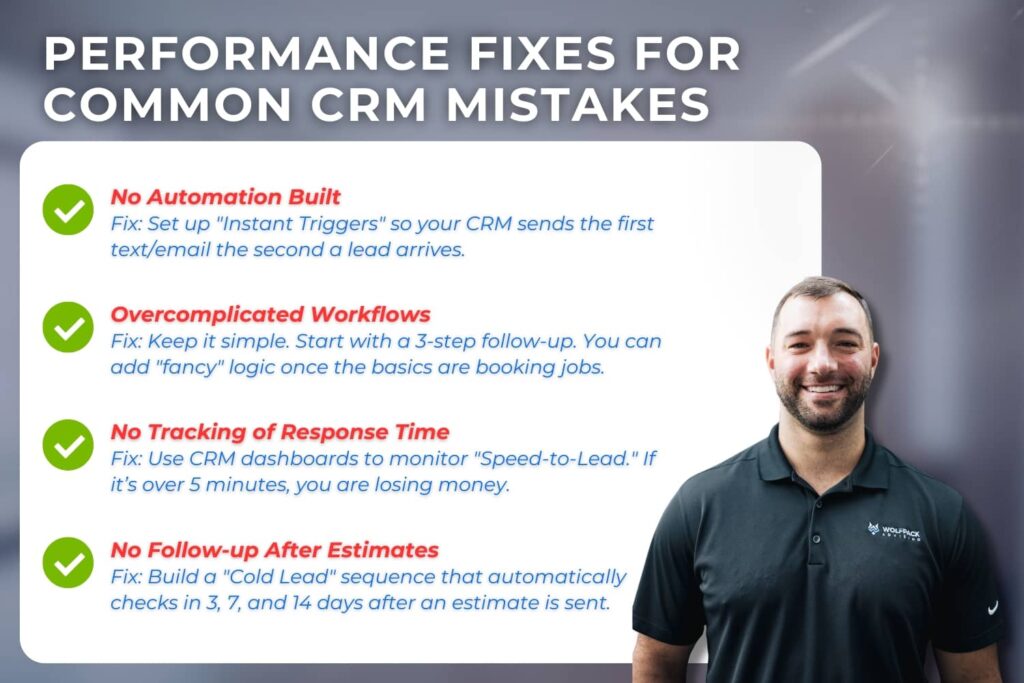
For example:
- Adding SMS alongside email increases open rates dramatically
- Reducing response time below 5 minutes improves booking probability
- Structured follow-ups prevent estimate loss
CRM implementation works best when connected to SEO, paid ads, and local marketing strategies.
Related Questions
What are examples of CRM workflows for contractors?
Common examples of CRM workflows for contractors include instant lead response automation, structured estimate follow-up sequences, and maintenance reminder campaigns.
Can CRM automation replace a sales team?
CRM automation does not replace a sales team. Instead, it supports your team by handling repetitive tasks like sending confirmations, reminders, and follow-ups. This allows your staff to focus on conversations, relationship building, and closing deals.
How long does it take to set up CRM automation?
Basic CRM workflows can often be set up within a few days if the process is simple. More advanced systems may take several weeks to plan, test, and optimize. The timeline depends on how detailed your customer journey and follow-up process are.
How much does a CRM cost for home service companies?
CRM pricing varies based on features, number of contacts, and automation capabilities. Some platforms start at lower monthly rates for basic tools, while more advanced systems can cost more as your database and feature needs grow.
Conclusion
The most effective CRM workflows share three non-negotiable traits: they respond instantly, follow up consistently, and nurture relationships over time. You do not need more manual effort to grow; you need better systems that work while you are off the clock.
If you want to identify your conversion gaps, WolfPack can review your current setup and help you map a high-performing customer journey. We provide the technical clarity you need to stop losing leads and start booking more jobs.
Stop leaving revenue on the table. Schedule your CRM Audit with WolfPack today, and let’s turn your database into a booking machine.