


Skip to content
New: Free AEO Grader. Score your site for AI search in 60 seconds. Try It

Know What Works. Grow With Confidence.

Clear marketing reporting connects visibility, website activity, and leads to the outcomes that matter. See the big picture with WolfPack’s Lead Center and Customer Portal, backed by the tools our team uses to guide your next move.

Jack Eshleman, Account ExecutiveHaley Amiott, Advertising SpecialistJenna Shishilla, COO

Marketing Reporting

From First Click to Real Opportunity

Your marketing report should help you make a decision. We bring together lead tracking, website analytics, search performance, and campaign results to show where opportunities come from and what to improve next.

Our Lead Center, powered by WhatConverts, tracks calls, forms, and chats back to their marketing sources. With Lead Qualification built in, those leads are matched to the jobs they became, so you see real revenue from every WolfPack service, not just inquiry volume.

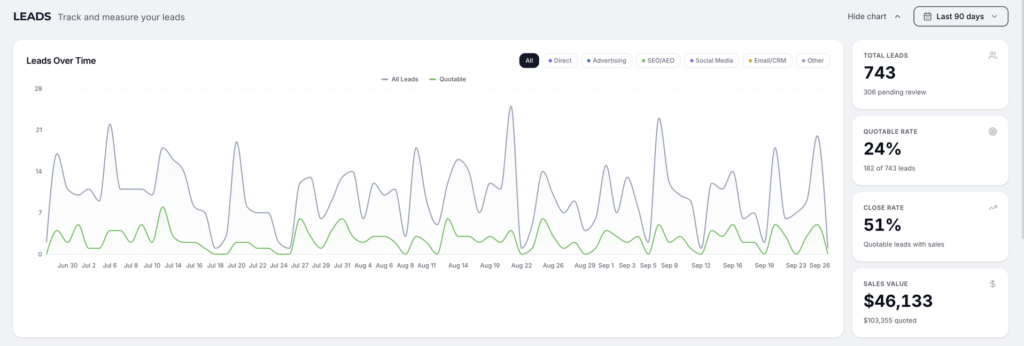
WolfPack Customer Portal Leads page showing quotable rate, close rate, and sales value

Your Customer Portal

Your Marketing, All in One Place

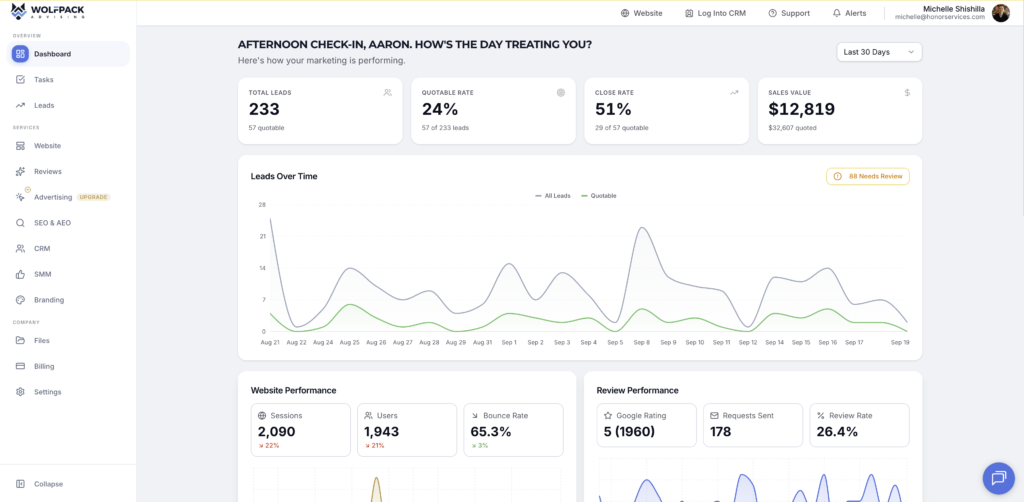
The WolfPack Customer Portal gives you a shared view of your marketing performance and your work with our team. Review leads over time, quotable rate, close rate, recorded sales value, website activity, and review performance.

Access tasks, service updates, files, and billing from the same workspace. Your dashboard keeps the numbers accessible, while our team helps explain what changed, why it matters, and where to focus next.

Already part of the pack? Log in to your Customer Portal →

WolfPack Customer Portal showing lead trends, quotable rate, close rate, sales value, website performance, and reviews.

What's Included

What's Included in Reporting

Lead Center · WhatConverts

See which marketing sources generate calls, forms, and chats. Built-in Lead Qualification adds quoted and sold values from ISN, Spectora, Jobber, FieldRoutes, or GorillaDesk automatically, so you can see which campaigns bring in revenue.


Google Analytics

Understand how visitors find and use your website. We review traffic sources, engagement, landing pages, and configured key events to identify where the customer journey can improve.

Google Search Console

See how your site performs in Google Search through clicks, impressions, search queries, and page performance. We use these insights to guide content and search optimization.

SEMRush

Monitor tracked keyword rankings and website audit findings to understand search progress and prioritize SEO work. These signals add context to your traffic and lead results.

Advertising & Other Tools

We use Google Ads, Meta Ads, your CRM, and other relevant tools alongside your reporting stack. The tools and connections depend on your services and the systems your business uses.

Customer Portal

Keep performance and collaboration close together. Your portal brings lead trends, website and review metrics, tasks, files, and billing into one accessible workspace.

Lead Qualification

Lead Qualification for ISN, Spectora, Jobber, FieldRoutes & GorillaDesk

Connect the software that books your jobs, and Lead Center fills in quoted and sold values for you.

ISN

ISN orders are matched to the Lead Center leads that booked them.

What syncs: each matched order's quoted and sold value, plus the order ID for quick lookup.

What it triggers: revenue by channel and by WolfPack service in your Customer Portal, and conversion values sent back to Google Ads and your other ad platforms.

How it connects: ISN connection, matched to your leads every day. Grant WolfPack access.

  • Inspection
  • Lead Qualification
  • Lead Center
See the ISN integration

Spectora

Spectora inspections are matched to the Lead Center leads that booked them.

What syncs: each matched inspection's quoted and sold value, plus the inspection ID for quick lookup.

What it triggers: revenue by channel and by WolfPack service in your Customer Portal, and conversion values sent back to Google Ads and your other ad platforms.

How it connects: Spectora API connection, matched to your leads every day. Grant WolfPack access.

  • Inspection
  • Lead Qualification
  • Lead Center
See the Spectora integration

Jobber

Jobber quotes and jobs are matched to the Lead Center leads that created them.

What syncs: each matched quote and job's value as the lead's quoted and sold value.

What it triggers: revenue by channel and by WolfPack service in your Customer Portal, and conversion values sent back to Google Ads and your other ad platforms.

How it connects: Secure Jobber sign-in, matched to your leads every day.

  • Pest/Field Service
  • Lead Qualification
  • Lead Center
See the Jobber integration

FieldRoutes (PestRoutes)

FieldRoutes customers and appointments are matched to the Lead Center leads that booked them.

What syncs: each matched customer's service value as the lead's quoted and sold value.

What it triggers: revenue by channel and by WolfPack service in your Customer Portal, and conversion values sent back to Google Ads and your other ad platforms.

How it connects: FieldRoutes API connection, matched to your leads every day. Set up FieldRoutes.

  • Pest/Field Service
  • Lead Qualification
  • Lead Center
See the FieldRoutes integration

GorillaDesk

GorillaDesk jobs are matched to the Lead Center leads that booked them.

What syncs: each matched job's value as the lead's quoted and sold value.

What it triggers: revenue by channel and by WolfPack service in your Customer Portal, and conversion values sent back to Google Ads and your other ad platforms.

How it connects: GorillaDesk connection, matched to your leads every day.

  • Pest/Field Service
  • Lead Qualification
  • Lead Center
See the GorillaDesk integration

The Process

How It Works

  1. 01

    Define What Matters

    Agree on the leads, actions, and business outcomes that make a useful report for your team.

  2. 02

    Connect & Check

    Set up the relevant tracking and reporting tools, then check that the configured sources and events are being captured.

  3. 03

    Review the Full Picture

    Look at search visibility, website activity, lead quality, and recorded sales outcomes together.

  4. 04

    Turn Insight Into Action

    Use the findings to prioritize campaign changes, website improvements, and follow-up opportunities.

Lead Qualification

From First Call to Sold Job, Automatically

Step 1

A Lead Comes In

Lead Center tracks the call, form, or chat and ties it to the exact campaign, keyword, or channel that produced it.

Step 2

Matched to Your Scheduler

Every day, new ISN, Spectora, Jobber, FieldRoutes, or GorillaDesk orders are matched to the leads that booked them. Nobody on your team has to tag a thing.

Step 3

Quoted & Sold Values in Your Portal

Quoted and sold values land on each lead, so your Customer Portal shows real revenue from every WolfPack service.

Step 4

Ad Platforms Learn What Sells

Conversion values go back to Google Ads, Microsoft Ads, and Meta, so their bidding optimizes for the leads that book and bring in the most revenue.

Meet the Pack

Your Reporting Team

  • Aaron Shishilla

    Aaron Shishilla

    CEO & Founder

  • Tania Calderón

    Tania Calderón

    Advertising Specialist

  • Haley Amiott

    Haley Amiott

    Advertising Specialist

  • Sarah Bryant

    Sarah Bryant

    Advertising Team Lead

Case Studies

Results We've Delivered

Related Reading

From the Blog

Quick Questions

Frequently Asked Questions

What is the difference between Lead Center and the Customer Portal?

Lead Center is our WhatConverts-powered system for lead tracking and attribution. The Customer Portal gives you a broader view of your marketing performance and your work with WolfPack, including tasks, files, and billing.

Can you report on revenue and ROI?

Yes. With Lead Qualification, your leads are matched to ISN, Spectora, Jobber, FieldRoutes, or GorillaDesk orders, and quoted and sold values fill in automatically. Combined with your marketing costs, that shows true ROI for every channel and every WolfPack service. If you use different scheduling software, your team can record values in Lead Center, or we can check what can connect. See every option on our Integrations page.

Why do numbers differ between reporting tools?

Each tool measures a different part of the journey and may use different attribution rules, date ranges, and update schedules. Search Console reports search activity, Analytics reports website activity, and Lead Center reports tracked inquiries. We explain those differences instead of treating every metric as interchangeable.

Will every tool be connected to my Customer Portal?

Your reporting setup depends on your services and available integrations. Our team may use tools such as SEMRush and Search Console for analysis alongside the metrics shown in your portal. We will clarify what is available in your dashboard and how the other findings inform your strategy.

How does automatic lead qualification work?

Lead Center tracks every lead back to the campaign, keyword, or channel that produced it. Every day, we check your ISN, Spectora, Jobber, FieldRoutes, or GorillaDesk account for new orders and match each one to the lead that booked it using contact details and timing. When there is a match, the quoted and sold values are added to the lead. Your Customer Portal then shows revenue by channel and by service, and nobody on your team has to tag leads by hand.

Do you send conversion values back to Google Ads?

Yes. Quoted and sold values from Lead Qualification go back to Google Ads, Microsoft Ads, and Meta as conversion values. Instead of treating every form fill the same, their bidding learns which leads turn into booked, high-value jobs and finds more people like them. It is one of the biggest reasons Lead Center and our advertising services work better together.

Reviews

Real Results, Real People.

Ready for a Clearer Picture? Let’s Connect the Dots.

Tell us about your goals. We’ll show you how reporting can guide your next stage of growth.