



Skip to content
New: Free AEO Grader. Score your site for AI search in 60 seconds. Try It

Integrations That Connect Marketing to Revenue

WolfPack connects the software that books your jobs to your CRM, your Lead Center, and your ad platforms. You see exactly which marketing brings in sold work, and your campaigns learn to find more of it.

Ashley Bronson, Account ExecutiveKailey Hess, CRM SpecialistAaron Shishilla, CEO & Founder

CRM Integrations

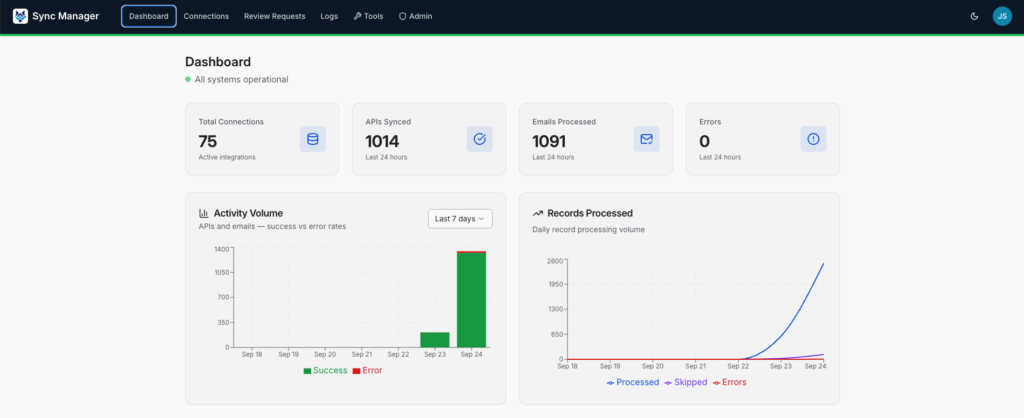
Sync Manager Keeps Your CRM Current

Most CRM integrations copy a name and an email and call it done. Sync Manager was built by WolfPack for home service businesses, so it understands jobs, not just contacts. It knows the difference between a client and a buyer’s agent, when an inspection is published, and when a pest control appointment is complete.

There is nothing for your team to log into or manage. Sync Manager runs in the background, every sync is logged, and our team is alerted if a connection needs attention. It works with both HubSpot and ActiveCampaign and is free and included with any CRM integration setup.

WolfPack Sync Manager for CRM Integrations

Lead Qualification

Know What Every Lead Is Worth

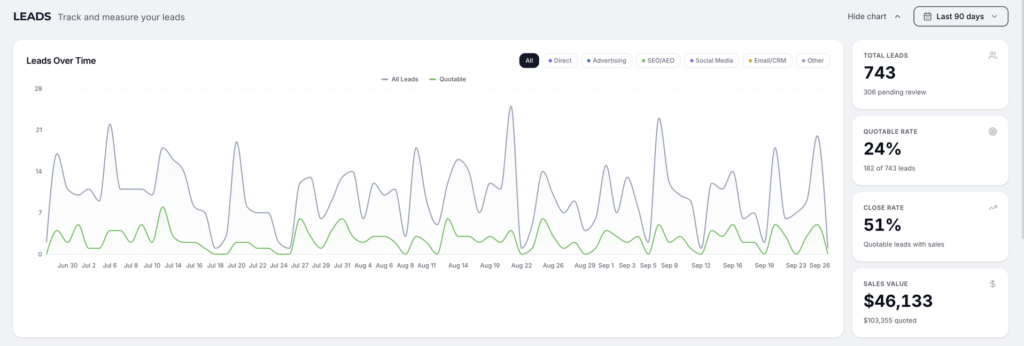
Lead Qualification is an add-on to Lead Center, right inside your Customer Portal. Connect ISN, Spectora, Jobber, FieldRoutes, or GorillaDesk, and every call, form, and chat is matched to the order or job it turned into. Quoted and sold values land on the lead automatically, with no spreadsheets and no manual tagging.

Every lead is already tied to the campaign that produced it, so you see real revenue from SEO, Google Ads, Microsoft Ads, Meta Ads, and every other WolfPack service. That is true ROI, not just lead counts.

Those conversion values go back to Google Ads and your other ad platforms, too. Instead of chasing any form fill, their bidding learns which leads book and which bring in the most revenue, then finds more people like them.

WolfPack Customer Portal Leads page showing quotable rate, close rate, and sales value

Integrations

Every Integration and What It Does

Filter by the software you run. CRM integrations work with HubSpot and ActiveCampaign through Sync Manager, and Lead Qualification integrations feed quoted and sold values into Lead Center.

ISN (Inspection Support Network)

WolfPack is ISN's official digital marketing partner. Lead Qualification: ISN orders are matched to the Lead Center leads that booked them, so quoted and sold values show up in your ROI reporting and go back to Google Ads and your other ad platforms as conversion values.

What syncs: each order's client, buyer's agent, and listing agent as contacts, with agents linked to their agency. Each order becomes a deal with inspection type, date and time, fee, address, inspector, add-on services, paid, agreement signed, and report completed.

What it triggers: inspection booked → contact and deal. Confirmed, completed, or canceled → deal stage updates. Paid and completed → deal won. Inspection counted → the agent's totals for lifetime, the last 12 months, and year to date update.

How it connects: ISN API connection through Sync Manager for HubSpot and ActiveCampaign, and through Lead Center for Lead Qualification. Set it up yourself: grant WolfPack access · how the sync works.


  • Inspection
  • HubSpot
  • ActiveCampaign
  • Lead Qualification
CRM for Home Inspectors

Spectora

Lead Qualification: Spectora inspections are matched to the Lead Center leads that booked them, so quoted and sold values show up in your ROI reporting and go back to Google Ads and your other ad platforms as conversion values.

What syncs: the client, buyer's agent, and listing agent as contacts, with agents linked to their agency. Each inspection becomes a deal with inspection type, services and add-ons, date and time, fee, address, inspector, paid, agreement required and signed, and report published, plus any Spectora custom fields you choose to map.

What it triggers: inspection booked → contact and deal. Confirmed, published, or canceled → deal moves to the stage you map. Paid, published, and agreement signed → deal won. Inspection counted → the agent's totals for lifetime, the last 12 months, and year to date update.

How it connects: Spectora API with real-time webhooks through Sync Manager for HubSpot and ActiveCampaign, and through Lead Center for Lead Qualification. Set it up yourself: grant WolfPack access · how the sync works.

  • Inspection
  • HubSpot
  • ActiveCampaign
  • Lead Qualification
CRM for Home Inspectors

Jobber

Lead Qualification: Jobber quotes and jobs are matched back to the leads that created them, so quoted and sold values show up in your ROI reporting and go back to Google Ads and your other ad platforms as conversion values.

What syncs: your Jobber customers and jobs into HubSpot or ActiveCampaign.

What it triggers: new job → contact and a deal or record in your CRM. Job completed → your follow-up automations start.

How it connects: Secure Jobber sign-in through Sync Manager for HubSpot and ActiveCampaign, and through Lead Center for Lead Qualification.

  • Pest/Field Service
  • HubSpot
  • ActiveCampaign
  • Lead Qualification
Lead Tracking & ROI Reporting

FieldRoutes (PestRoutes)

Lead Qualification: FieldRoutes customers and appointments are matched back to the leads that booked them, so quoted and sold values show up in your ROI reporting and go back to Google Ads and your other ad platforms as conversion values.

What syncs: your customers' names, emails, and phone numbers as contacts in HubSpot or ActiveCampaign.

What it triggers: new booking → contact and a deal or record in your CRM. Customer synced → ready for upsell, cross-sell, and renewal automations. Appointment completed → your follow-up automations start.

How it connects: FieldRoutes API connection through Sync Manager for HubSpot and ActiveCampaign, and through Lead Center for Lead Qualification, with scheduled syncs and checks for completed appointments. Set it up yourself: FieldRoutes setup guide.

  • Pest/Field Service
  • HubSpot
  • ActiveCampaign
  • Lead Qualification
CRM for Pest Control

GorillaDesk

Lead Qualification: GorillaDesk jobs are matched back to the leads that booked them, so quoted and sold values show up in your ROI reporting and go back to Google Ads and your other ad platforms as conversion values.

What syncs: customers from your GorillaDesk jobs as contacts in HubSpot or ActiveCampaign.

What it triggers: new job → contact and a deal or record in your CRM. Customer synced → ready for targeted follow-up. Job completed → your follow-up automations start.

How it connects: GorillaDesk connection through Sync Manager for HubSpot and ActiveCampaign, and through Lead Center for Lead Qualification, with scheduled syncs and checks for completed jobs.

  • Pest/Field Service
  • HubSpot
  • ActiveCampaign
  • Lead Qualification
CRM for Pest Control

Lead Center (WhatConverts)

Lead Center, powered by WhatConverts, is where Lead Qualification happens. It tracks every call, form, and chat back to the campaign, keyword, or channel that produced it.

What syncs: tracked calls, forms, and chats with their marketing source, plus quoted and sold values from ISN, Spectora, Jobber, FieldRoutes, or GorillaDesk.

What it triggers: real revenue by channel and by WolfPack service in your Customer Portal, and conversion values sent back to Google Ads, Microsoft Ads, and Meta.

How it connects: Call tracking numbers and a website script that WolfPack installs and manages. Results show in your Customer Portal. Learn more: Lead Center overview.

  • Reporting & Analytics
  • Lead Qualification
  • Lead Center
  • Customer Portal
Lead Tracking & ROI Reporting

Google Business Profile

See the calls and leads your Google Business Profile brings in, right next to the rest of your marketing.

What syncs: calls and form leads from your profile, tracked back to Google Business Profile in Lead Center, plus your review performance.

What it triggers: profile leads that are matched to ISN, Spectora, Jobber, FieldRoutes, or GorillaDesk jobs show their quoted and sold values, so you can see what your profile is really worth.

How it connects: Add WolfPack as a manager on your profile. Set it up yourself: add WolfPack as a manager.

  • Reporting & Analytics
  • Lead Qualification
  • Lead Center
  • Customer Portal
Local SEO

Google Analytics

See how visitors find and use your website, from the first visit to the actions that matter.

What syncs: traffic sources, engagement, landing pages, and the key events we configure for your site.

How it connects: Google Analytics 4 access for the WolfPack team. Website activity shows in your Customer Portal.

  • Reporting & Analytics
  • Customer Portal
Marketing Reporting

Google Search Console

See how your site shows up in Google Search and which searches bring people in.

What syncs: clicks, impressions, search queries, and page performance.

How it connects: Search Console access for the WolfPack team, reviewed alongside your reporting.

  • Reporting & Analytics
SEO Services

Semrush

Track search progress and catch site issues before they cost you rankings.

What syncs: tracked keyword rankings and website audit findings.

How it connects: Monitored in WolfPack's Semrush agency account and reviewed alongside your reporting.

  • Reporting & Analytics
SEO Services

Microsoft Ads

Reach Bing searchers and see exactly which clicks turn into booked work.

What syncs: spend, clicks, and conversions for your ROI reporting.

What it triggers: quoted and sold values go back as conversion values, so automated bidding favors your highest-value leads.

How it connects: Managed through WolfPack's Microsoft Advertising account.

  • Ad Platforms
  • Customer Portal
  • Conversion Values
Microsoft Ads Management

Meta Ads

Facebook and Instagram campaigns measured by the jobs they bring in, not just clicks.

What syncs: campaign results for your ROI reporting.

What it triggers: quoted and sold values go back as conversion events, so Meta shows your ads to people most likely to book.

How it connects: Managed through WolfPack's Meta Business Manager.

  • Ad Platforms
  • Conversion Values
Meta Ads Management

Zapier

What it does: connects HubSpot or ActiveCampaign to thousands of other apps when there is no direct integration, like website forms, scheduling tools, and more.

What it triggers: new record in a connected app → contact in your CRM. Job completed in a connected app → your follow-up automations start.

How it connects: Zapier connection through Sync Manager, set up by WolfPack. Works with HubSpot and ActiveCampaign.

  • General
  • HubSpot
  • ActiveCampaign
CRM Management

Key Features

What You Get

  • Inspection & job sync

    ISN, Spectora, FieldRoutes, GorillaDesk, and Jobber bookings create or update contacts and deals in your CRM.

  • Agent referral tracking

    See every agent's inspection count for lifetime, the last 12 months, and year to date, right on their contact record.

  • Automatic lead qualification

    Leads are matched to ISN, Spectora, Jobber, FieldRoutes, and GorillaDesk orders, with quoted and sold values filled in for you.

  • True ROI by service

    See revenue by channel and by WolfPack service in your Customer Portal.

  • Smarter ad bidding

    Conversion values go back to Google Ads and other ad platforms, so they chase your highest-value leads.

  • Every sync logged

    Each sync is logged, and our team is alerted if a connection needs attention.

  • Free with any CRM integration setup

    Sync Manager is free and included with any CRM integration setup. Lead Qualification is available as an add-on in Lead Center.

Case Studies

Results We've Delivered

Related Reading

From the Blog

Quick Questions

Frequently Asked Questions

Does WolfPack integrate with ISN, Spectora, Jobber, FieldRoutes, and GorillaDesk for lead tracking?

Yes. Through Lead Qualification in Lead Center, WolfPack matches your tracked calls, forms, and chats to ISN orders, Spectora inspections, Jobber quotes and jobs, FieldRoutes appointments, and GorillaDesk jobs. Quoted and sold values fill in automatically, so you can see which marketing channels and WolfPack services bring in real revenue. The same systems also connect to HubSpot and ActiveCampaign through Sync Manager.

How does automatic lead qualification work?

Lead Center tracks every lead back to the campaign, keyword, or channel that produced it. Every day, we check your ISN, Spectora, Jobber, FieldRoutes, or GorillaDesk account for new orders and match each one to the lead that booked it using contact details and timing. When there is a match, the quoted and sold values are added to the lead. Your Customer Portal then shows revenue by channel and by service, and nobody on your team has to tag leads by hand.

Do you send conversion values back to Google Ads?

Yes. Quoted and sold values from Lead Qualification go back to Google Ads, Microsoft Ads, and Meta as conversion values. Instead of treating every form fill the same, their bidding learns which leads turn into booked, high-value jobs and finds more people like them. It is one of the biggest reasons Lead Center and our advertising services work better together.

What is Sync Manager?

Sync Manager is WolfPack’s proprietary connector. It runs behind the scenes, so your team never logs into it or manages it. It keeps the software that runs your jobs, like ISN, Spectora, FieldRoutes, GorillaDesk, Jobber, and Zapier, in sync with your CRM in HubSpot or ActiveCampaign. Unlike a basic contact sync, it understands home service work. It separates clients from buyer’s and listing agents, links agents to their agency, turns each inspection into a deal that moves through your pipeline, and tracks agent referral counts. It is free and included with any CRM integration setup, and our team watches every connection.

Does ISN integrate with ActiveCampaign?

Yes. Sync Manager connects ISN to ActiveCampaign through the ISN API. Each order creates or updates the client, buyer’s agent, and listing agent as contacts, with agents linked to their agency. Each order becomes a deal with inspection type, date, fee, address, inspector, and add-on services. Deals update as orders are confirmed, completed, or canceled, and are marked won once paid and completed. ISN connects to HubSpot the same way. WolfPack is also ISN’s official digital marketing partner.

How does Sync Manager track real estate agent referrals?

When an inspection syncs from ISN or Spectora, Sync Manager adds the buyer’s agent and listing agent to your CRM in their roles and links each one to their agency. Each inspection counts toward that agent’s totals for lifetime, the last 12 months, and year to date, stored right on the agent’s contact record. Agents who stop sending you work can enter an inactive agent re-engagement automation. You can see your top referral partners at a glance and build automations that thank and nurture them.

Which CRMs does Sync Manager work with?

Sync Manager works with HubSpot and ActiveCampaign, the two platforms WolfPack builds on. Every integration we offer, including ISN, Spectora, FieldRoutes, GorillaDesk, Jobber, and Zapier, connects to both, so you can pick the CRM that fits your business without giving up a connection. Sync Manager is free and included with any CRM integration setup. If you are choosing a CRM now, our HubSpot onboarding page explains why we recommend HubSpot for most growing home service businesses.

What if my software is not listed?

Tell us what you use. Many tools connect through Zapier, which links HubSpot or ActiveCampaign to thousands of apps, so new records and completed jobs can still reach your CRM. We also add direct integrations as clients need them. On your strategy call, we will check your exact software and show you what can sync today.

How much do CRM integrations cost?

Sync Manager is included with every onboarding and every monthly plan, so there is no separate integration license. Setup starts at $750 one-time and depends on complexity, like how many systems we connect and what they trigger in your CRM. After that, a monthly maintenance plan keeps your integrations running and monitored, or CRM Management adds dedicated specialist hours on top. Your HubSpot or ActiveCampaign license is separate. Book a strategy call and we will scope your exact software.

Reviews

Real Results, Real People.

Connect Your Systems. See Your ROI.

Tell us what you use to book jobs, and we'll show you what can sync today, from your CRM to Lead Center to your ad campaigns.